Don't miss your chance to take the Fabric Data Engineer (DP-600) exam for FREE! Find out how by attending the DP-600 session on April 23rd (pacific time), live or on-demand.
Learn moreNext up in the FabCon + SQLCon recap series: The roadmap for Microsoft SQL and Maximizing Developer experiences in Fabric. All sessions are available on-demand after the live show. Register now
I need a date slicer with some predefined values:
Upon selecting any of these values, the from and to dates should be automatically set. Can this be done?
Hi amalekshahi,
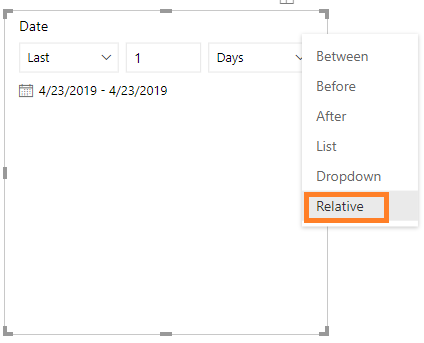
Put your date on slicer visual , and there is a dropdown arrow on the upper right corner of the visual. You can choose "Relative" . Then when you select the day, month ,year and numbers, the calendar slicer that you want will show.
Best Regards,
Amy
If this post helps, then please consider Accept it as the solution to help the other members find it more quickly.
Thanks @v-xicai but this is not the solution I was looking for. I am familiar with the relative option in date slicer but it isn't easy to use for beginners.
Hi @amalekshahi ,
Could you please share your sample data or desired output screenshots for further analysis? You can also upload sample pbix to OneDrive and post the link here. Do mask sensitive data before uploading.
Best Regards,
Amy
Also this filter will be set against the date dimension's date column.
If you have recently started exploring Fabric, we'd love to hear how it's going. Your feedback can help with product improvements.
A new Power BI DataViz World Championship is coming this June! Don't miss out on submitting your entry.
| User | Count |
|---|---|
| 1 | |
| 1 | |
| 1 | |
| 1 | |
| 1 |
| User | Count |
|---|---|
| 4 | |
| 4 | |
| 3 | |
| 3 | |
| 2 |