Get Fabric or SQL Certified for Free.
Get certified for free when you join Fabric Data Days 2026 and dive into Fabric, Power BI, SQL, AI, and other essential data skills.
Join now- Power BI forums
- Get Help with Power BI
- Desktop
- Service
- Report Server
- Power Query
- Mobile Apps
- Developer
- DAX Commands and Tips
- Custom Visuals Development Discussion
- Health and Life Sciences
- Power BI Spanish forums
- Translated Spanish Desktop
- Training and Consulting
- Instructor Led Training
- Dashboard in a Day for Women, by Women
- Galleries
- Data Stories Gallery
- Themes Gallery
- Contests Gallery
- QuickViz Gallery
- Quick Measures Gallery
- Visual Calculations Gallery
- Notebook Gallery
- Translytical Task Flow Gallery
- TMDL Gallery
- R Script Showcase
- Webinars and Video Gallery
- Ideas
- Custom Visuals Ideas (read-only)
- Issues
- Issues
- Events
- Upcoming Events
July 7 - July 17 | Round 2 of the Power BI Dataviz World Championships. Don't miss your chance! Learn more
- Power BI forums
- Forums
- Get Help with Power BI
- Developer
- Re: [REST API] Datasets Take Over: Positional Para...
- Subscribe to RSS Feed
- Mark Topic as New
- Mark Topic as Read
- Float this Topic for Current User
- Bookmark
- Subscribe
- Printer Friendly Page

- Mark as New
- Bookmark
- Subscribe
- Mute
- Subscribe to RSS Feed
- Permalink
- Report Inappropriate Content
[REST API] Datasets Take Over: Positional Parameter cannot be found that accepts argument 'Method'
Getting the following error when trying to take over dataset using this REST API: https://docs.microsoft.com/en-us/rest/api/power-bi/datasets/take-over-in-group

Following is my code:
#Login using Service Principal
#-------------------------------
cls
$applicationId = "XXXXX"
$clientsec = "XXXXX" | ConvertTo-SecureString -AsPlainText -Force #
$tenantId = "XXXXX"
$resource = "https://analysis.windows.net/powerbi/api"

$credential = New-Object -TypeName System.Management.Automation.PSCredential -ArgumentList $applicationId, $clientsec
Connect-PowerBIServiceAccount -ServicePrincipal -Credential $credential -TenantId $tenantId

# Get token
#-------------------------------
$token = Get-PowerBIAccessToken -AsString


# Building Rest API header with authorization token
#-------------------------------
$authHeader = @{
'Content-Type'='application/json'
'Authorization'=$token
}

#Group and Dataset Parameters
#-------------------------------
$group= "xxxxx" #workspace ID
$dataset= "xxxxxx" #dataset ID


# POST body
#-------------------------------
$postParams = @{
"datasetId" = "$dataset"
}
$jsonPostBody = $postParams | ConvertTo-JSON

$Url = "https://api.powerbi.com/v1.0/myorg/groups/$group/datasets/$dataset/Default.TakeOver"


## Take Over DataSet
#-------------------------------
Invoke-PowerBIRestMethod -Url $Url -Headers $authHeader -Body $jsonPostBody Method -POST -Verbose
The Service Principal has the following permissions:
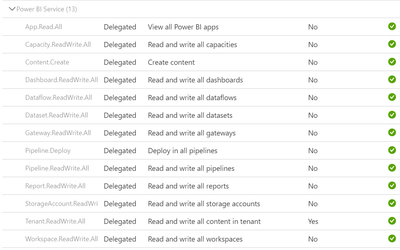
What am I missing? Please help! Thanks in advance.


- Mark as New
- Bookmark
- Subscribe
- Mute
- Subscribe to RSS Feed
- Permalink
- Report Inappropriate Content
@Anonymous instead of
Method -Post
you need
-Method POST
- Mark as New
- Bookmark
- Subscribe
- Mute
- Subscribe to RSS Feed
- Permalink
- Report Inappropriate Content
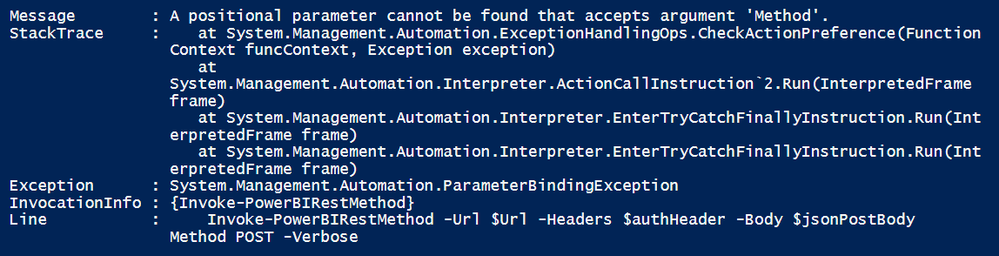
Getting the same error after replacing -POST with POST:
- Mark as New
- Bookmark
- Subscribe
- Mute
- Subscribe to RSS Feed
- Permalink
- Report Inappropriate Content
Please read my reply again. Use -Method (note the dash)
- Mark as New
- Bookmark
- Subscribe
- Mute
- Subscribe to RSS Feed
- Permalink
- Report Inappropriate Content
Thank you, I changed the code but getting this new error now:
Invoke-PowerBIRestMethod -Url $Url -Headers $authHeader -Body $jsonPostBody -Method POST -Verbose

- Mark as New
- Bookmark
- Subscribe
- Mute
- Subscribe to RSS Feed
- Permalink
- Report Inappropriate Content
Looks like
Get-PowerBIAccessToken -AsString
returns more than you need. Investigate that and then only use the auth part.
most likely
$authHeader = @{
'Content-Type'='application/json'
'Authorization'=$token.Values[0]
}
- Mark as New
- Bookmark
- Subscribe
- Mute
- Subscribe to RSS Feed
- Permalink
- Report Inappropriate Content
Hmm, maybe the issue is elsewhere. Both
Connect-PowerBIServiceAccount
$headers = Get-PowerBIAccessToken -AsString
$authHeader = @{
'Content-Type'='application/json'
'Authorization'=$headers
}
Invoke-RestMethod -Headers $authHeader -Uri 'https://api.powerbi.com/v1.0/myorg/groups'
and
Connect-PowerBIServiceAccount
$headers = Get-PowerBIAccessToken
Invoke-RestMethod -Headers $headers -Uri 'https://api.powerbi.com/v1.0/myorg/groups'
work for me.
Maybe Invoke-PowerBIRestMethod is the culprit. Use Invoke-RestMethod instead.
- Mark as New
- Bookmark
- Subscribe
- Mute
- Subscribe to RSS Feed
- Permalink
- Report Inappropriate Content
Tried this code:
Invoke-RestMethod -Uri $Url -Headers $authHeader -Body $jsonPostBody -Method POST -Verbose
Getting the following error now:


- Mark as New
- Bookmark
- Subscribe
- Mute
- Subscribe to RSS Feed
- Permalink
- Report Inappropriate Content
@Anonymous replace the nonunicode "-" sign and type "-" again to each parameter.
Helpful resources

FabCon & SQLCon – Barcelona 2026
Join us in Barcelona for FabCon and SQLCon, the Fabric, Power BI, SQL, and AI community event. Save €200 with code FABCMTY200.

Data Days 2026
Join Fabric Data Days 2026: 60 days of free live/on-demand sessions, challenges, study groups, and certification opportunities.

Power BI DataViz World Championships - June 2026
A new Power BI DataViz World Championship is coming this June! Don't miss out on submitting your entry.


| User | Count |
|---|---|
| 5 | |
| 3 | |
| 2 | |
| 2 | |
| 2 |


