Join us at FabCon Atlanta from March 16 - 20, 2026, for the ultimate Fabric, Power BI, AI and SQL community-led event. Save $200 with code FABCOMM.
Register now!Get Fabric Certified for FREE during Fabric Data Days. Don't miss your chance! Request now
Hi,
I am trying to get rooms let figure for all room night bookings within a particular Month.
My data source is SQL.
I have a table with DateArrive and DateDepart.
e.g Data
DateArrive DateDepart NoOfNights
01/10/2022 03/10/2022 2
28/09/2022 04/10/2022 6
31/10/2022 11/11/2022 11
31/10/2022 31/10/2022 0
I am looking at October room nights and a guest arrives in September I am only after the nights the guest is staying in October i.e if a guests arrives in September from the above example I need to only include the 3 nights they are staying in October. The same goes if the guest is arrivng in October and departing in November. Also note if a guest arrives after night audit the noOfNights is 0. This has to be treated as 1.
Solved! Go to Solution.
Hi @KAZ ,
I created a sample pbix file(see attachment) for you, please check whether that is what you want. You can create a measure as below:
Measure =
VAR _mindate =
DATE ( 2022, 10, 1 )
VAR _maxdate =
DATE ( 2022, 10, 31 )
VAR _ardate =
SELECTEDVALUE ( 'Table'[DateArrive] )
VAR _deptdate =
SELECTEDVALUE ( 'Table'[DateDepart] )
RETURN
SWITCH (
TRUE (),
_deptdate < _mindate
|| _ardate > _maxdate, BLANK (),
_ardate >= _mindate
&& _deptdate <= _maxdate
&& _ardate = _deptdate, 1,
DATEDIFF (
IF ( _ardate > _mindate, _ardate, _mindate ),
IF ( _deptdate >= _maxdate, _maxdate, _deptdate ),
DAY
)
)
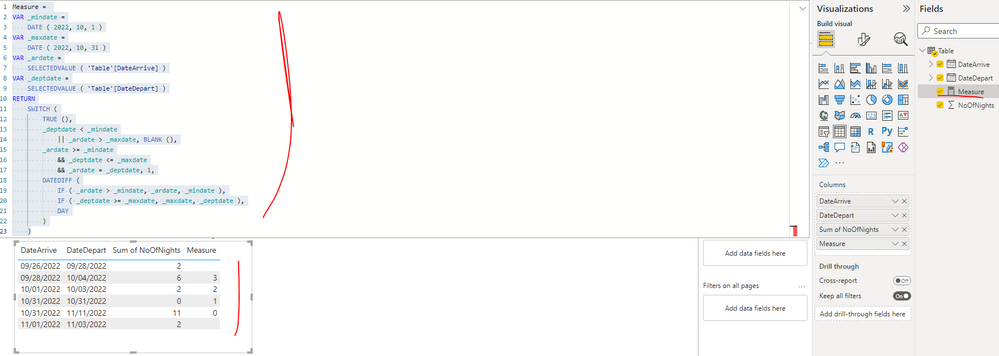
If the above one can't help you get the desired result, please provide some sample data in your tables (exclude sensitive data) with Text format and your expected result with backend logic and special examples. It is better if you can share a simplified pbix file. You can refer the following link to upload the file to the community. Thank you.
How to upload PBI in Community
Best Regards
Hi @KAZ ,
I created a sample pbix file(see attachment) for you, please check whether that is what you want. You can create a measure as below:
Measure =
VAR _mindate =
DATE ( 2022, 10, 1 )
VAR _maxdate =
DATE ( 2022, 10, 31 )
VAR _ardate =
SELECTEDVALUE ( 'Table'[DateArrive] )
VAR _deptdate =
SELECTEDVALUE ( 'Table'[DateDepart] )
RETURN
SWITCH (
TRUE (),
_deptdate < _mindate
|| _ardate > _maxdate, BLANK (),
_ardate >= _mindate
&& _deptdate <= _maxdate
&& _ardate = _deptdate, 1,
DATEDIFF (
IF ( _ardate > _mindate, _ardate, _mindate ),
IF ( _deptdate >= _maxdate, _maxdate, _deptdate ),
DAY
)
)
If the above one can't help you get the desired result, please provide some sample data in your tables (exclude sensitive data) with Text format and your expected result with backend logic and special examples. It is better if you can share a simplified pbix file. You can refer the following link to upload the file to the community. Thank you.
How to upload PBI in Community
Best Regards
Also note if a guest arrives after night audit the noOfNights is 0. This has to be treated as 1.
There will be ambiguity if they arrive late (after midnight) but then stay for more than one night. How are you planning to handle that? Ideally you would have an additional column indicating late arrival.
Check out the November 2025 Power BI update to learn about new features.
Advance your Data & AI career with 50 days of live learning, contests, hands-on challenges, study groups & certifications and more!