Join us in Barcelona for FabCon and SQLCon, September 28 - October 1, 2026.
This is best Fabric, Power BI, SQL and AI community event. How do we know? The last event sold out! Save €200 with code FABCMTY200.
Register now- Power BI forums
- Get Help with Power BI
- Desktop
- Service
- Report Server
- Power Query
- Mobile Apps
- Developer
- DAX Commands and Tips
- Custom Visuals Development Discussion
- Health and Life Sciences
- Power BI Spanish forums
- Translated Spanish Desktop
- Training and Consulting
- Instructor Led Training
- Dashboard in a Day for Women, by Women
- Galleries
- Data Stories Gallery
- Themes Gallery
- Contests Gallery
- QuickViz Gallery
- Quick Measures Gallery
- Visual Calculations Gallery
- Fabric Apps Gallery
- Notebook Gallery
- Translytical Task Flow Gallery
- TMDL Gallery
- R Script Showcase
- Webinars and Video Gallery
- Ideas
- Custom Visuals Ideas (read-only)
- Issues
- Issues
- Events
- Upcoming Events
The Fabric community is now in read-only for platform upgrade. Learn more
- Power BI forums
- Forums
- Get Help with Power BI
- Developer
- Re: [REST API] Datasets Take Over: Positional Para...
- Subscribe to RSS Feed
- Mark Topic as New
- Mark Topic as Read
- Float this Topic for Current User
- Bookmark
- Subscribe
- Printer Friendly Page

- Mark as New
- Bookmark
- Subscribe
- Mute
- Subscribe to RSS Feed
- Permalink
[REST API] Datasets Take Over: Positional Parameter cannot be found that accepts argument 'Method'
Getting the following error when trying to take over dataset using this REST API: https://docs.microsoft.com/en-us/rest/api/power-bi/datasets/take-over-in-group

Following is my code:
#Login using Service Principal
#-------------------------------
cls
$applicationId = "XXXXX"
$clientsec = "XXXXX" | ConvertTo-SecureString -AsPlainText -Force #
$tenantId = "XXXXX"
$resource = "https://analysis.windows.net/powerbi/api"

$credential = New-Object -TypeName System.Management.Automation.PSCredential -ArgumentList $applicationId, $clientsec
Connect-PowerBIServiceAccount -ServicePrincipal -Credential $credential -TenantId $tenantId

# Get token
#-------------------------------
$token = Get-PowerBIAccessToken -AsString


# Building Rest API header with authorization token
#-------------------------------
$authHeader = @{
'Content-Type'='application/json'
'Authorization'=$token
}

#Group and Dataset Parameters
#-------------------------------
$group= "xxxxx" #workspace ID
$dataset= "xxxxxx" #dataset ID


# POST body
#-------------------------------
$postParams = @{
"datasetId" = "$dataset"
}
$jsonPostBody = $postParams | ConvertTo-JSON

$Url = "https://api.powerbi.com/v1.0/myorg/groups/$group/datasets/$dataset/Default.TakeOver"


## Take Over DataSet
#-------------------------------
Invoke-PowerBIRestMethod -Url $Url -Headers $authHeader -Body $jsonPostBody Method -POST -Verbose
The Service Principal has the following permissions:
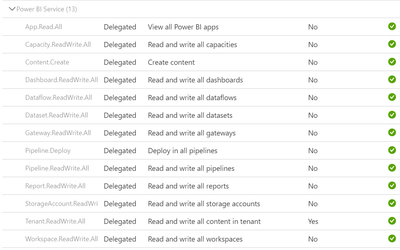
What am I missing? Please help! Thanks in advance.


- Mark as New
- Bookmark
- Subscribe
- Mute
- Subscribe to RSS Feed
- Permalink
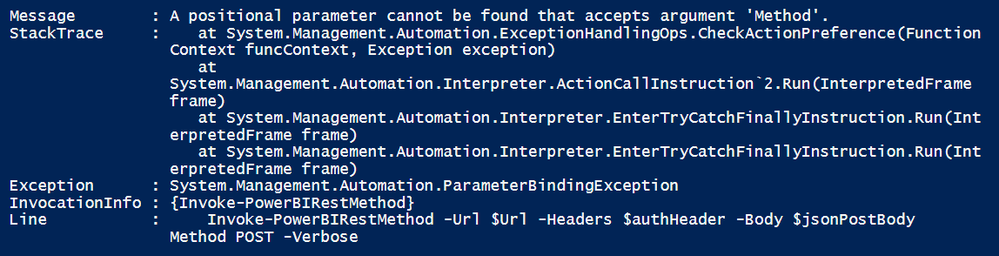
Getting the same error after replacing -POST with POST:
- Mark as New
- Bookmark
- Subscribe
- Mute
- Subscribe to RSS Feed
- Permalink
Please read my reply again. Use -Method (note the dash)
- Mark as New
- Bookmark
- Subscribe
- Mute
- Subscribe to RSS Feed
- Permalink
Thank you, I changed the code but getting this new error now:
Invoke-PowerBIRestMethod -Url $Url -Headers $authHeader -Body $jsonPostBody -Method POST -Verbose

- Mark as New
- Bookmark
- Subscribe
- Mute
- Subscribe to RSS Feed
- Permalink
Looks like
Get-PowerBIAccessToken -AsString
returns more than you need. Investigate that and then only use the auth part.
most likely
$authHeader = @{
'Content-Type'='application/json'
'Authorization'=$token.Values[0]
}
- Mark as New
- Bookmark
- Subscribe
- Mute
- Subscribe to RSS Feed
- Permalink
Hmm, maybe the issue is elsewhere. Both
Connect-PowerBIServiceAccount
$headers = Get-PowerBIAccessToken -AsString
$authHeader = @{
'Content-Type'='application/json'
'Authorization'=$headers
}
Invoke-RestMethod -Headers $authHeader -Uri 'https://api.powerbi.com/v1.0/myorg/groups'
and
Connect-PowerBIServiceAccount
$headers = Get-PowerBIAccessToken
Invoke-RestMethod -Headers $headers -Uri 'https://api.powerbi.com/v1.0/myorg/groups'
work for me.
Maybe Invoke-PowerBIRestMethod is the culprit. Use Invoke-RestMethod instead.
- Mark as New
- Bookmark
- Subscribe
- Mute
- Subscribe to RSS Feed
- Permalink
Tried this code:
Invoke-RestMethod -Uri $Url -Headers $authHeader -Body $jsonPostBody -Method POST -Verbose
Getting the following error now:


- Mark as New
- Bookmark
- Subscribe
- Mute
- Subscribe to RSS Feed
- Permalink
@Anonymous replace the nonunicode "-" sign and type "-" again to each parameter.
Helpful resources

FabCon & SQLCon – Barcelona 2026
Join us in Barcelona for FabCon and SQLCon, the Fabric, Power BI, SQL, and AI community event. Save €200 with code FABCMTY200.

Power BI DataViz World Championships - June 2026
A new Power BI DataViz World Championship is coming this June! Don't miss out on submitting your entry.

| User | Count |
|---|---|
| 2 | |
| 1 | |
| 1 | |
| 1 | |
| 1 |


| User | Count |
|---|---|
| 1 | |
| 1 | |
| 1 | |
| 1 | |
| 1 |


