Don't miss your chance to take the Fabric Data Engineer (DP-700) exam on us!
Learn moreWe've captured the moments from FabCon & SQLCon that everyone is talking about, and we are bringing them to the community, live and on-demand. Starts on April 14th. Register now
Greetings,
I have some simple Python code to read an Excel Worksheet.
The code works in PyCharm IDE, but I get an error in Power BI.
I have spent two hours using Conda to remove, and pip to install the Python modules, but keep getting errors.
I would really appreciate any pointers to resolve this.
The code:
#!/usr/bin/env python
# coding: utf-8
import os, sys
import pandas as pd
import xlrd
import openpyxl, xlsxwriter
Jan2021 = r"mypath\2021_01.xlsx"
RouteJan = pd.read_excel(Jan2021, sheet_name='Route')
print(RouteJan)
Error msg:
Details: "ADO.NET: Python script error.
Traceback (most recent call last):
File "PythonScriptWrapper.PY", line 3, in <module>
matplotlib.use('Agg')
AttributeError: module 'matplotlib' has no attribute 'use'
Hi @Anonymous ,
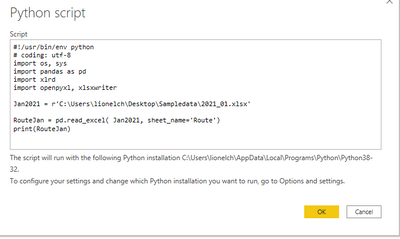
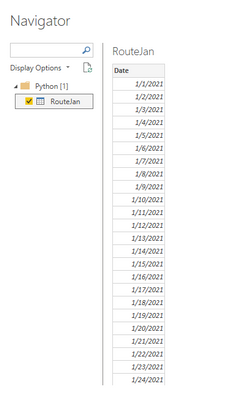
I did not reproduce your problem.
Maybe you can try this.
#!/usr/bin/env python
# coding: utf-8
import os, sys
import pandas as pd
import xlrd
import openpyxl, xlsxwriter
import matplotlib
matplotlib.use('agg')
import matplotlib.pyplot as plt # matplotlib.use('agg') must be run before this sentence is executed
Jan2021 = r'C:\Users\lionelch\Desktop\Sampledata\2021_01.xlsx'
RouteJan = pd.read_excel( Jan2021, sheet_name='Route')
print(RouteJan)
Best regards,
Lionel Chen
If this post helps, then please consider Accept it as the solution to help the other members find it more quickly.
If you have recently started exploring Fabric, we'd love to hear how it's going. Your feedback can help with product improvements.
A new Power BI DataViz World Championship is coming this June! Don't miss out on submitting your entry.
Share feedback directly with Fabric product managers, participate in targeted research studies and influence the Fabric roadmap.
| User | Count |
|---|---|
| 1 | |
| 1 | |
| 1 | |
| 1 | |
| 1 |