Join us at FabCon Atlanta from March 16 - 20, 2026, for the ultimate Fabric, Power BI, AI and SQL community-led event. Save $200 with code FABCOMM.
Register now!The Power BI Data Visualization World Championships is back! Get ahead of the game and start preparing now! Learn more
Greetings,
I have some simple Python code to read an Excel Worksheet.
The code works in PyCharm IDE, but I get an error in Power BI.
I have spent two hours using Conda to remove, and pip to install the Python modules, but keep getting errors.
I would really appreciate any pointers to resolve this.
The code:
#!/usr/bin/env python
# coding: utf-8
import os, sys
import pandas as pd
import xlrd
import openpyxl, xlsxwriter
Jan2021 = r"mypath\2021_01.xlsx"
RouteJan = pd.read_excel(Jan2021, sheet_name='Route')
print(RouteJan)
Error msg:
Details: "ADO.NET: Python script error.
Traceback (most recent call last):
File "PythonScriptWrapper.PY", line 3, in <module>
matplotlib.use('Agg')
AttributeError: module 'matplotlib' has no attribute 'use'
Hi @Anonymous ,
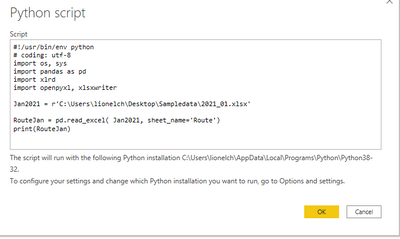
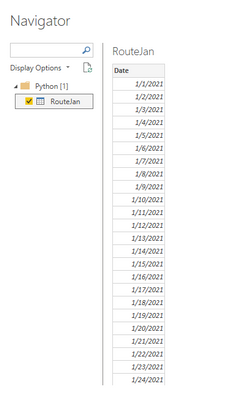
I did not reproduce your problem.
Maybe you can try this.
#!/usr/bin/env python
# coding: utf-8
import os, sys
import pandas as pd
import xlrd
import openpyxl, xlsxwriter
import matplotlib
matplotlib.use('agg')
import matplotlib.pyplot as plt # matplotlib.use('agg') must be run before this sentence is executed
Jan2021 = r'C:\Users\lionelch\Desktop\Sampledata\2021_01.xlsx'
RouteJan = pd.read_excel( Jan2021, sheet_name='Route')
print(RouteJan)
Best regards,
Lionel Chen
If this post helps, then please consider Accept it as the solution to help the other members find it more quickly.
The Power BI Data Visualization World Championships is back! Get ahead of the game and start preparing now!
| User | Count |
|---|---|
| 3 | |
| 2 | |
| 2 | |
| 1 | |
| 1 |
| User | Count |
|---|---|
| 11 | |
| 7 | |
| 4 | |
| 4 | |
| 3 |