cancel
Showing results for 
Search instead for 
Did you mean: 

We've captured the moments from FabCon & SQLCon that everyone is talking about, and we are bringing them to the community, live and on-demand. Starts on April 14th. Register now

Reply
dpc_development
Helper III
Helper III

Python in Power BI - Set background colour for matplotlib box plot

I am plotting a box plot using Python in Power BI. I have set the background colour of the Power BI report page to yellow and am trying to set the background colour of the python visual. I have the following code currently.


matplotlib.rc('axes', facecolor = 'red')
dataset.boxplot(column='daily_return', by='name', grid=False, figsize=(15,4))
matplotlib.pyplot.title('')
matplotlib.pyplot.suptitle('')
matplotlib.pyplot.xlabel('')
matplotlib.pyplot.show()

The above code results in the following picture... 


As can be seen, there is still some white space. How do I get that to be red, which I will eventually change to my Power BI background colour. 


If I can make the background transparent though, that'd be best.


I even tried the following to no avail.


fig = matplotlib.pyplot.figure()
fig.patch.set_facecolor('blue')
fig.patch.set_alpha(1)
 
2 REPLIES 2
Anonymous
Not applicable

Set the default matplotlib saving option to transperent like this:

import maplotlib
matplotlib.rc('savefig', transperent=True)

This worked for me.

I got this answer from this https://stackoverflow.com/a/55746288/6819442


lvcoffman
New Member

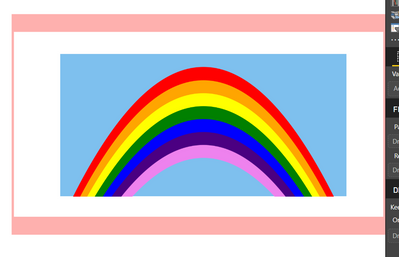
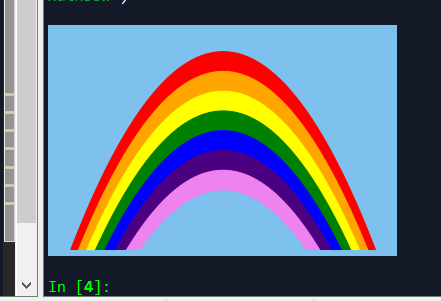
I'm having the exact same issue!  I am putting together a demo for my team, and I would like to make the "sky" blue, but cannot for the life of me figure out how to turn the white boarder blue (or transparent as OP stated.)

Rainbow - Power BI Desktop.png

I have tried setting the figure facecolor and edgecolor to blue:


fig1 = plt.figure(1,facecolor='#7ec0ee', edgecolor='#7ec0ee')  <- This did nothing

ax = fig1.add_subplot(1,1,1)

ax.set_facecolor('#7ec0ee') <- this worked


These seem to work in Spyder, but when I put the visual into Power BI the white boarder appears.


2Spyder - Rainbow.png

Helpful resources

Announcements
New to Fabric survey Carousel

New to Fabric Survey

If you have recently started exploring Fabric, we'd love to hear how it's going. Your feedback can help with product improvements.

Power BI DataViz World Championships carousel

Power BI DataViz World Championships - June 2026

A new Power BI DataViz World Championship is coming this June! Don't miss out on submitting your entry.

Join our Fabric User Panel

Join our Fabric User Panel

Share feedback directly with Fabric product managers, participate in targeted research studies and influence the Fabric roadmap.

March Power BI Update Carousel

Power BI Community Update - March 2026

Check out the March 2026 Power BI update to learn about new features.