cancel
Showing results for 
Search instead for 
Did you mean: 

The Power BI Data Visualization World Championships is back! It's time to submit your entry. Live now!

Reply
FR5702
Helper I
Helper I

Problem with tooltip, multi value don't work anymore

Hi all, 


I need your help with a problem I didn't have before.

I created a tooltip with multiple values for a same display name, it worked before without any problem and now it's not working. I checked with my old code version and it's still not working...

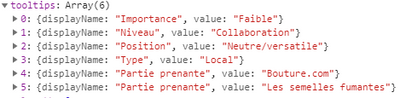
My chart should show me (it's the data I use for my point) : 

Capture1.PNG

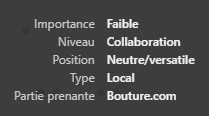
And it only shows me :

Capturetemp.PNG

What is the reason for this change ? Has there any tooltips-related changes in an update recently ? 

Thank you !


EDIT: It seems to be related to the fact that my two last arrays have the same display name, but it wasn't a problem before, so what has change ? 

1 ACCEPTED SOLUTION
v-viig
Community Champion
Community Champion

Tooltip Service does not support the same display names. We recommend to add a number or additional space into duplicated displayName to avoid collision.


Ignat Vilesov,

Software Engineer


Microsoft Power BI Custom Visuals

pbicvsupport@microsoft.com

View solution in original post

5 REPLIES 5
v-viig
Community Champion
Community Champion

Tooltip Service does not support the same display names. We recommend to add a number or additional space into duplicated displayName to avoid collision.


Ignat Vilesov,

Software Engineer


Microsoft Power BI Custom Visuals

pbicvsupport@microsoft.com

Thank you @v-viig,


That's what I did, I add 1,2,3,... in my displayname when there is more than 1 with the same displayname.

v-viig
Community Champion
Community Champion

Could you please describe use case? What do you show the same displayNames for?


Ignat Vilesov,

Software Engineer


Microsoft Power BI Custom Visuals

pbicvsupport@microsoft.com

Sure !


My case is the one I explain in this topic :


As I regroup, in my code, my data depending on 4 dimensions, I have some points on my chart that represents multiple lines of my original data (1 point for each group of dataPoint).

So for my users to see what lines/dataPoints are represented by this particular point, I put the name dimension of each line/dataPoint (+ the 4 dimensions) in my tooltip.


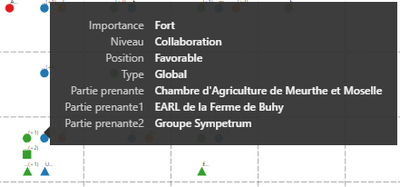
The result is this one:

Capturetemp.PNG 


Sorry my data is in French...

But you can see that the last 3 lines in my tooltips are "Partie prenante"/"Partie prenante1" & "Partie prenante2" which is the name dimension of my data. So I have 1 point (here it's a square) representing 3 points/lines with the same dimensions.

Previously I could have the same displayname but this solution is fine.


If it's not clear enough, tell me 🙂

v-viig
Community Champion
Community Champion

I see. Thanks for the clarification.


Ignat Vilesov,

Software Engineer


Microsoft Power BI Custom Visuals

pbicvsupport@microsoft.com

Helpful resources

Announcements
FabCon Atlanta 2026 carousel

FabCon Atlanta 2026

Join us at FabCon Atlanta, March 16-20, for the ultimate Fabric, Power BI, AI and SQL community-led event. Save $200 with code FABCOMM.