This time we’re going bigger than ever. Fabric, Power BI, SQL, AI and more. We're covering it all. You won't want to miss it.
Learn moreDid you hear? There's a new SQL AI Developer certification (DP-800). Start preparing now and be one of the first to get certified. Register now
Hi all,
I need your help with a problem I didn't have before.
I created a tooltip with multiple values for a same display name, it worked before without any problem and now it's not working. I checked with my old code version and it's still not working...
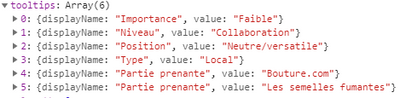
My chart should show me (it's the data I use for my point) :
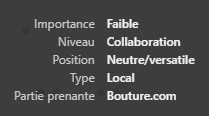
And it only shows me :
What is the reason for this change ? Has there any tooltips-related changes in an update recently ?
Thank you !
EDIT: It seems to be related to the fact that my two last arrays have the same display name, but it wasn't a problem before, so what has change ?
Solved! Go to Solution.
Tooltip Service does not support the same display names. We recommend to add a number or additional space into duplicated displayName to avoid collision.
Ignat Vilesov,
Software Engineer
Microsoft Power BI Custom Visuals
Tooltip Service does not support the same display names. We recommend to add a number or additional space into duplicated displayName to avoid collision.
Ignat Vilesov,
Software Engineer
Microsoft Power BI Custom Visuals
Thank you @v-viig,
That's what I did, I add 1,2,3,... in my displayname when there is more than 1 with the same displayname.
Could you please describe use case? What do you show the same displayNames for?
Ignat Vilesov,
Software Engineer
Microsoft Power BI Custom Visuals
Sure !
My case is the one I explain in this topic :
As I regroup, in my code, my data depending on 4 dimensions, I have some points on my chart that represents multiple lines of my original data (1 point for each group of dataPoint).
So for my users to see what lines/dataPoints are represented by this particular point, I put the name dimension of each line/dataPoint (+ the 4 dimensions) in my tooltip.
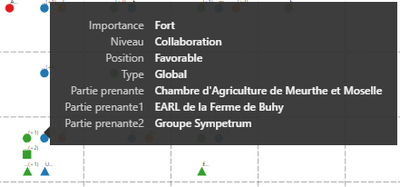
The result is this one:
Sorry my data is in French...
But you can see that the last 3 lines in my tooltips are "Partie prenante"/"Partie prenante1" & "Partie prenante2" which is the name dimension of my data. So I have 1 point (here it's a square) representing 3 points/lines with the same dimensions.
Previously I could have the same displayname but this solution is fine.
If it's not clear enough, tell me 🙂
I see. Thanks for the clarification.
Ignat Vilesov,
Software Engineer
Microsoft Power BI Custom Visuals
Check out the April 2026 Power BI update to learn about new features.
Sign up to receive a private message when registration opens and key events begin.
If you have recently started exploring Fabric, we'd love to hear how it's going. Your feedback can help with product improvements.
| User | Count |
|---|---|
| 4 | |
| 2 | |
| 1 | |
| 1 | |
| 1 |