Share feedback directly with Fabric product managers, participate in targeted research studies and influence the Fabric roadmap.
Sign up nowGet Fabric certified for FREE! Don't miss your chance! Learn more
Helllo Everyone,
I ran the following commands for installing the Power BI moules for Powershell.
Install-Module -Name Microsoft.PowerBI.PowerShell
Install-Module -Name Microsoft.ADAL.PowerShell
Install-Module -Name Microsoft.PowerBI.PowerShell
I got the following error message.
PS H:\> Login-PowerBI
Login-PowerBI : Unable to find setting configuration
At line:1 char:1
+ Login-PowerBI
+ ~~~~~~~~~~~~~
+ CategoryInfo : NotSpecified: (:) [], FileNotFoundException
+ FullyQualifiedErrorId : System.IO.FileNotFoundException
Kindly help in resolving this.
Regards,
Manhoj
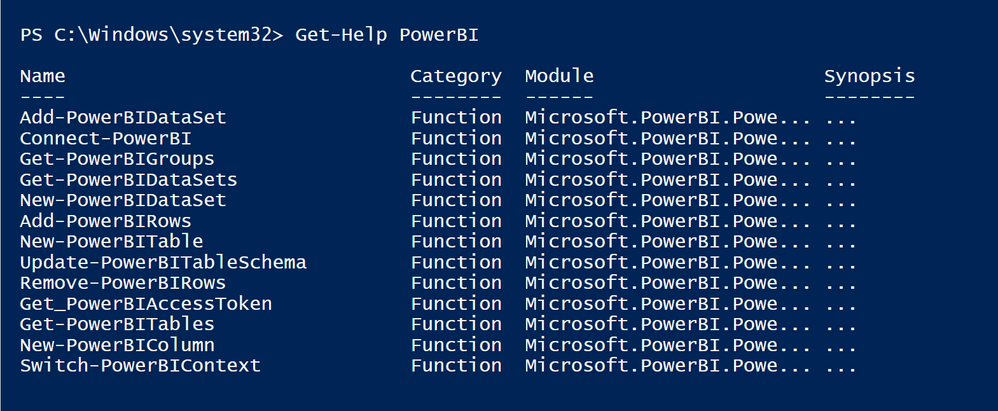
Well. After installing the module, I ran Get-Help and this is what I see.
I do not see the Login-...cmdlet.
However, the Connect-PowerBI failed with the following error:
Connect-PowerBI : The 'Connect-PowerBI' command was found in the module 'Microsoft.PowerBI.PowerShell', but the module could not be
loaded. For more information, run 'Import-Module Microsoft.PowerBI.PowerShell'.
At line:1 char:1
+ Connect-PowerBI
+ ~~~~~~~~~~~~~~~
+ CategoryInfo : ObjectNotFound: (Connect-PowerBI:String) [], CommandNotFoundException
+ FullyQualifiedErrorId : CouldNotAutoloadMatchingModule
Thinking what to do next...
Share feedback directly with Fabric product managers, participate in targeted research studies and influence the Fabric roadmap.
| User | Count |
|---|---|
| 3 | |
| 2 | |
| 2 | |
| 1 | |
| 1 |
| User | Count |
|---|---|
| 5 | |
| 4 | |
| 3 | |
| 3 | |
| 2 |