cancel
Showing results for 
Search instead for 
Did you mean: 

The Power BI Data Visualization World Championships is back! Get ahead of the game and start preparing now! Learn more

Reply
manhoj
Regular Visitor

Powershell command for Power BI

Helllo Everyone,


I ran the following commands for installing the Power BI moules for Powershell.


Install-Module -Name Microsoft.PowerBI.PowerShell

Install-Module -Name Microsoft.ADAL.PowerShell
Install-Module -Name Microsoft.PowerBI.PowerShell

I got the following error message.

 
PS H:\> Login-PowerBI
Login-PowerBI : Unable to find setting configuration
At line:1 char:1
+ Login-PowerBI
+ ~~~~~~~~~~~~~
+ CategoryInfo : NotSpecified: (:) [], FileNotFoundException
+ FullyQualifiedErrorId : System.IO.FileNotFoundException


Kindly help in resolving this.


Regards,

Manhoj

2 REPLIES 2
mysorian
Helper I
Helper I

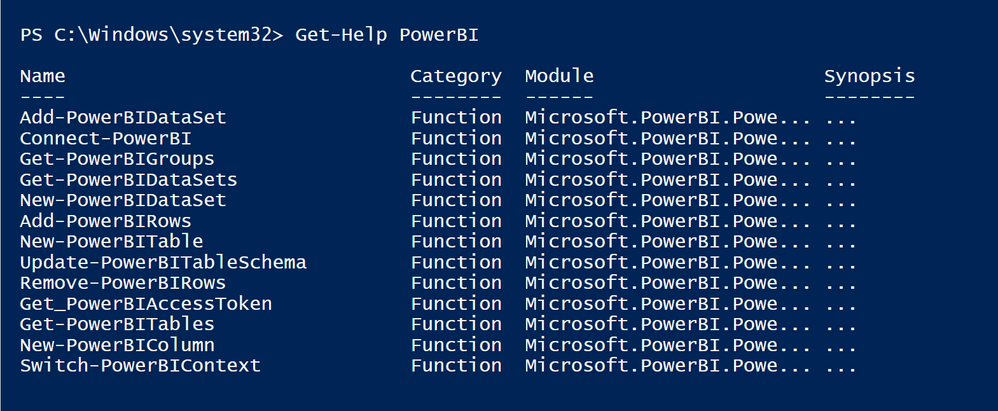
Well. After installing the module, I ran Get-Help and this is what I see.


PS_PowerBI_3.png


I do not see the Login-...cmdlet.


However, the Connect-PowerBI failed with the following error:

Connect-PowerBI : The 'Connect-PowerBI' command was found in the module 'Microsoft.PowerBI.PowerShell', but the module could not be
loaded. For more information, run 'Import-Module Microsoft.PowerBI.PowerShell'.
At line:1 char:1
+ Connect-PowerBI
+ ~~~~~~~~~~~~~~~
+ CategoryInfo : ObjectNotFound: (Connect-PowerBI:String) [], CommandNotFoundException
+ FullyQualifiedErrorId : CouldNotAutoloadMatchingModule


Thinking what to do next...

Helpful resources

Announcements
Power BI DataViz World Championships

Power BI Dataviz World Championships

The Power BI Data Visualization World Championships is back! Get ahead of the game and start preparing now!

December 2025 Power BI Update Carousel

Power BI Monthly Update - December 2025

Check out the December 2025 Power BI Holiday Recap!

FabCon Atlanta 2026 carousel

FabCon Atlanta 2026

Join us at FabCon Atlanta, March 16-20, for the ultimate Fabric, Power BI, AI and SQL community-led event. Save $200 with code FABCOMM.