Hi, I have embedded Power BI into my web application but regardless the browser, the screensize what so ever, a vertical scrollbar shows up. How can I get rid of it (the one highlighted in yellow in the following screenshot)?

Here is my code:
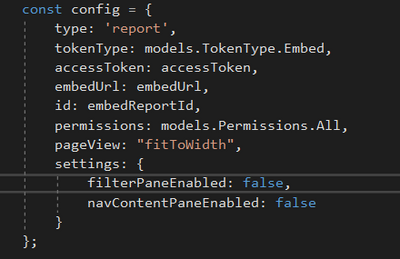
And the div that calls the embedContainer goes like this:
<div id="embedContainer" style="height: calc((100vw - 60px) * 0.59) !important; width: 100% !important; overflow: hidden !important; margin: auto !important; "></div>
How can I get rid of the vertical scrollbar.
The things I already tried that didnt worked:
1. I already tried in the config code with "fitToWidth", and with "actualSize" and with "oneColumn". None worked
2. I alredy tried by publishing in the first place from the Power BI Desktop in the differnet fashions "Fit To Width", "Actual Size", "Fit To Page", etc
3. I already tried combinations of 1. and 2.
4. I already visited all posts here and in stackoverflow, such as , but not limited to:
https://community.powerbi.com/t5/Developer/Embedded-Paginated-report-scrolling-issue/m-p/2106021#M32...
https://stackoverflow.com/questions/66527385/powerbi-embedded-vertical-scrollbar-not-visible
https://community.powerbi.com/t5/Issues/Auto-scroll-in-Embedded-reports/idi-p/235218
https://community.powerbi.com/t5/Developer/Power-BI-Embedded-Mobile-View-showing-double-vertical-scr...
Any help highly appreciated.
Best.


