cancel
Showing results for 
Search instead for 
Did you mean: 

We've captured the moments from FabCon & SQLCon that everyone is talking about, and we are bringing them to the community, live and on-demand. Starts on April 14th. Register now

Reply
Rice
Helper I
Helper I

OData - Microsoft Graph API - UnexpectedXmlElement

Hello All,


A little new to API calls. Would appreciate assistance.


The setup in the query statement below was working fine up until November 18th, 2020:
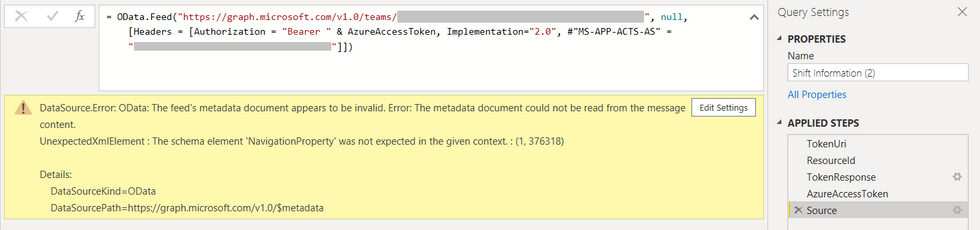
MicrosoftGraphAPI_Issue.png


After which point it can no longer refresh due to the below error.


DataSource.Error: OData: The feed's metadata document appears to be invalid. Error: The metadata document could not be read from the message content.
UnexpectedXmlElement : The schema element 'NavigationProperty' was not expected in the given context. : (1, 376318)

Details:
    DataSourceKind=OData
    DataSourcePath=https://graph.microsoft.com/v1.0/$metadata


I'm wondering as to what I can do to resolve the error. I've investigated as best I can, but cannot seem to understand why it's happening.


The query statement is below, with confidential information redacted:


let
     TokenUri = "https://login.microsoftonline.com/" & #"Azure Tenant Id" & "/oauth2/token",
     ResourceId = "https://graph.microsoft.com",
     TokenResponse = Json.Document(Web.Contents(TokenUri,
     [
     Content = Text.ToBinary(Uri.BuildQueryString([client_id = #"Azure Application Id", resource = ResourceId, grant_type = "client_credentials", client_secret = #"Azure Application Client Secret"])),
     Headers = [Accept = "application/json"], ManualStatusHandling = {400}
         ]
     )),
     AzureAccessToken = TokenResponse[access_token],
    Source = OData.Feed("https://graph.microsoft.com/v1.0/teams/12a3bc4d-ab56-12a3-1a23-123456ab7def/schedule", null, [Headers = [Authorization = "Bearer " & AzureAccessToken, Implementation="2.0", #"MS-APP-ACTS-AS" = "1234a567-12a3-1a23-1234-1ab2c345678d"]])
in
    Source


Appreciate your assistance in advance!


Kind regards,

~Rice

2 REPLIES 2
Galen
New Member

I have the same problem:

some users I have an error and others do not


DataSource.NotFound: OData: Request failed (404): Error en el servidor remoto: (404) No se encontró. (Resource 'manager' does not exist or one of its queried reference-property objects are not present.)
Detalles:
DataSourceKind=OData
DataSourcePath=https://graph.windows.net/xxxxxxx.com.mx/directoryObjects/4fc95bc9-9efe-4645-8603-04213b6a9f9d/Micro...
Url=https://graph.windows.net/xxxxxxx.com.mx/directoryObjects/4fc95bc9-9efe-4645-8603-04213b6a9f9d/Micro...

systemic_till
Regular Visitor

I am facing the same issue as well, also since mid November.
Frustration = high.

Helpful resources

Announcements
New to Fabric survey Carousel

New to Fabric Survey

If you have recently started exploring Fabric, we'd love to hear how it's going. Your feedback can help with product improvements.

Power BI DataViz World Championships carousel

Power BI DataViz World Championships - June 2026

A new Power BI DataViz World Championship is coming this June! Don't miss out on submitting your entry.

Join our Fabric User Panel

Join our Fabric User Panel

Share feedback directly with Fabric product managers, participate in targeted research studies and influence the Fabric roadmap.

March Power BI Update Carousel

Power BI Community Update - March 2026

Check out the March 2026 Power BI update to learn about new features.