Don't miss your chance to take the Fabric Data Engineer (DP-700) exam on us!
Learn moreNext up in the FabCon + SQLCon recap series: The roadmap for Microsoft SQL and Maximizing Developer experiences in Fabric. All sessions are available on-demand after the live show. Register now
Hi,
I've noticed within the past week that the decomposition tree visual has broken on my reports. It was a marketplace visual that seems to have disappeared completely. Does anybody know why it's gone/ if it's likely to return?
Thanks!
Solved! Go to Solution.
Hi @Incarnadine ,
It's in Preview. Here's the article: https://docs.microsoft.com/en-us/power-bi/visuals/power-bi-visualization-decomposition-tree
Open Power BI Desktop. Select File > Options and settings > Options >Preview features. Check decomposition tree(preview) and restart Desktop, it should now be in the visual pane.
Hi @Incarnadine
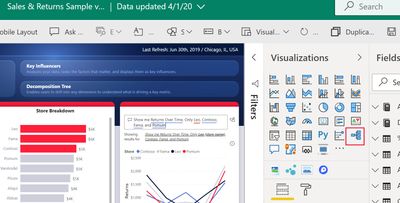
Decomp tree is now a native visual in Power BI You don't need to go out to marketplace/appsource to get it. See the red outline in the Visualization pane, below.
Hi @Anonymous
Thanks for you response, glad to hear it's gone core it's a great visual!
Unfortunately I can't seem to find it on my visualizations pane, I'm on the latest version (I have the new ribbon on the top etc)
I can see on yours below it's between Key Influencers and Q&A, I don't seem to have anything there. Is there something I need to do first?
Thanks!
Hi @Incarnadine ,
It's in Preview. Here's the article: https://docs.microsoft.com/en-us/power-bi/visuals/power-bi-visualization-decomposition-tree
Open Power BI Desktop. Select File > Options and settings > Options >Preview features. Check decomposition tree(preview) and restart Desktop, it should now be in the visual pane.
Hi @Anonymous,
Perfect! Thanks for your help it's much appreciated 🙂
Have accepted as solution
If you have recently started exploring Fabric, we'd love to hear how it's going. Your feedback can help with product improvements.
A new Power BI DataViz World Championship is coming this June! Don't miss out on submitting your entry.
Share feedback directly with Fabric product managers, participate in targeted research studies and influence the Fabric roadmap.
| User | Count |
|---|---|
| 2 | |
| 1 | |
| 1 | |
| 1 | |
| 1 |