Don't miss your chance to take the Fabric Data Engineer (DP-600) exam for FREE! Find out how by watching the DP-600 session on-demand now through April 28th.
Learn moreJoin the FabCon + SQLCon recap series. Up next: Power BI, Real-Time Intelligence, IQ and AI, and Data Factory take center stage. All sessions are available on-demand after the live show. Register now
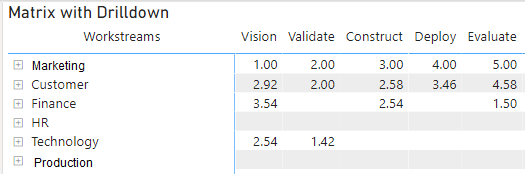
I have spent a lot of time getting results of data from a survey (which has 5 dimensions in data model) into a matrix like I want to see it in the resulting chart.
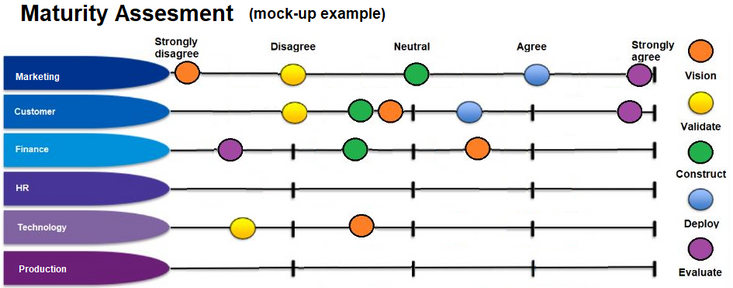
Below is a mock-up image (done in MS Paint) of how I expect this chart to look.
Just wondering if anybody else has any recommendations on visualizations that could produce a chart like this?
Solved! Go to Solution.
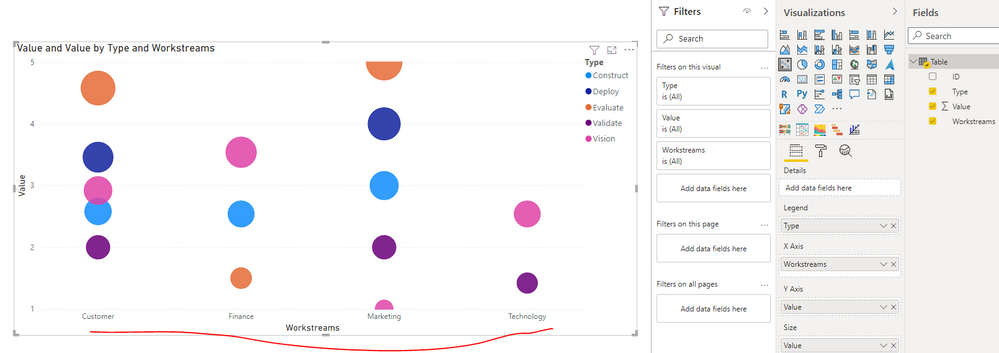
Thank you very much for your response. So close, if only there was a way to flip X and Y Axis 🙂
I will mark as response as I think this will be as close as I am going to get. I tried Scatter graph before but probably got hung up on trying to get Worsstreams on the Y Axis.
Also noted the additional Visuals you had tried and after fidling with the Power KPI Matrix a bit I think it might also be a suitable alternative workaround. (i.e. it is supposed to show progress as progress is made through vision, validate, construct...etc.) I will try attach .pbix that will give better visual (but cannot see how this is done)
Really appreciate the time you have put in to respond to this.
Check out the April 2026 Power BI update to learn about new features.
If you have recently started exploring Fabric, we'd love to hear how it's going. Your feedback can help with product improvements.
A new Power BI DataViz World Championship is coming this June! Don't miss out on submitting your entry.
| User | Count |
|---|---|
| 2 | |
| 1 | |
| 1 | |
| 1 | |
| 1 |
| User | Count |
|---|---|
| 8 | |
| 8 | |
| 4 | |
| 3 | |
| 2 |