Join us at FabCon Atlanta from March 16 - 20, 2026, for the ultimate Fabric, Power BI, AI and SQL community-led event. Save $200 with code FABCOMM.
Register now!The Power BI Data Visualization World Championships is back! Get ahead of the game and start preparing now! Learn more
Hi,
A link to the custom visual for a journey chart:
https://appsource.microsoft.com/en-us/product/power-bi-visuals/WA104380989?tab=Overview
I'm trying to build a journey chart visual using the data below:
When I try using the visual, nothing shows up. The order should be:
Service organization --> service category --> service --> solution --> application
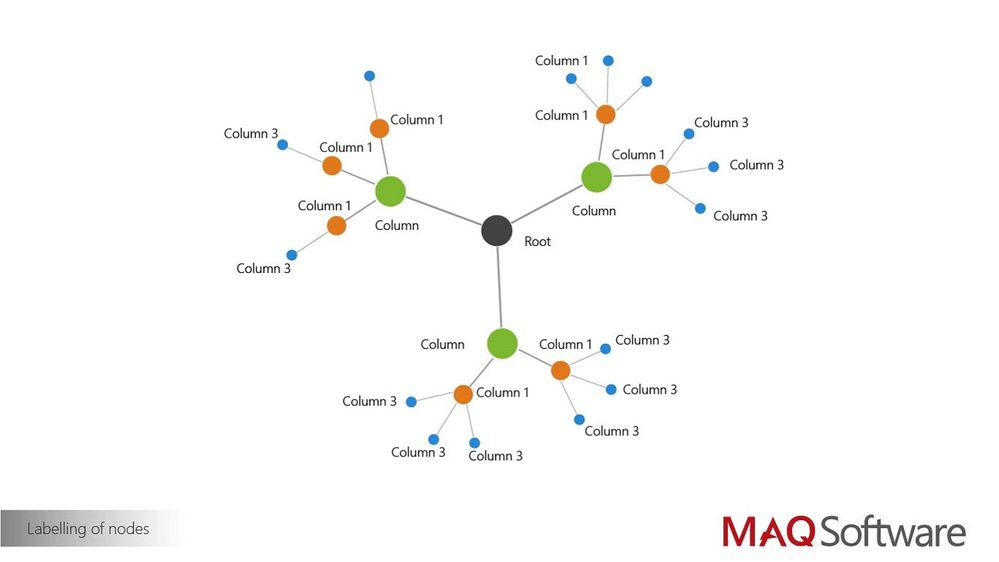
it should look something like this:
where the root would be the service organization, column as service category, column 1 as service, column 2 as solution, and column 3 as application.
I don't have any measure data, but is that something I need in order to use this visual? If so, are there any other custom visuals out there that are better suited for what I'm trying to achieve?
Hi,
You need measure data. without it the graph won't populate.
Since this custom visual is a third party custom visual we would recommend to reach out its developer to find out more: https://maqsoftware.com/expertise/powerbi
Ignat Vilesov,
Software Engineer
Microsoft Power BI Custom Visuals
The Power BI Data Visualization World Championships is back! Get ahead of the game and start preparing now!
| User | Count |
|---|---|
| 3 | |
| 2 | |
| 2 | |
| 1 | |
| 1 |
| User | Count |
|---|---|
| 7 | |
| 4 | |
| 4 | |
| 4 | |
| 4 |