Join us at FabCon Atlanta from March 16 - 20, 2026, for the ultimate Fabric, Power BI, AI and SQL community-led event. Save $200 with code FABCOMM.
Register now!The Power BI Data Visualization World Championships is back! Get ahead of the game and start preparing now! Learn more
I tried get the list of parameters using REST API as: https://api.powerbi.com/v1.0/myorg/groups/$group_id/datasets/$dataset_id/parameters" , but get the response as empty array even though parameters are managed.
Result :object(stdClass)#2 (2) { ["@odata.context"]=> string(98) "https://api.powerbi.com/v1.0/myorg/groups/$group_id/$metadata#parameters" ["value"]=> array(0) { } }
Does anybody get success in this parameters REST Api, please share your idea? Thanks in Advance.
Solved! Go to Solution.
Hi @navaraj,
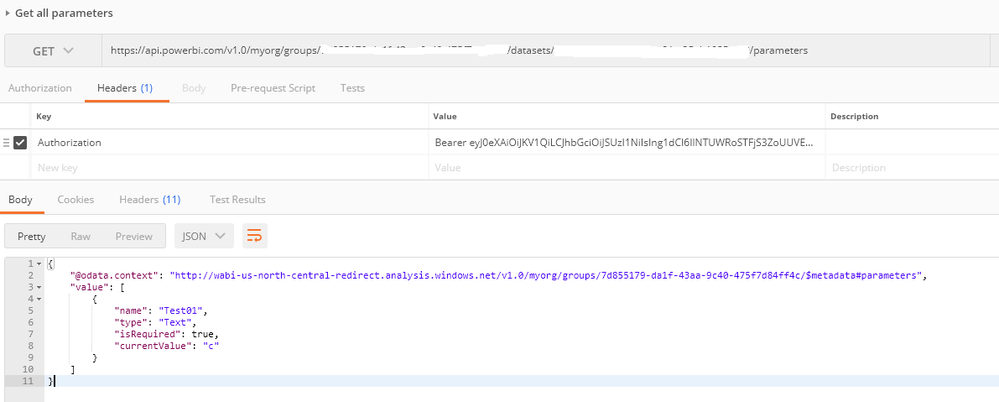
I just verified that I can use the Get all parameters REST API to get available parameters in a dataset.
Note that the query parameter must be referenced/used in at least one of your queries in your dataset, or it won't be returned by the REST API. ![]()
Regards
Hi @navaraj,
I just verified that I can use the Get all parameters REST API to get available parameters in a dataset.
Note that the query parameter must be referenced/used in at least one of your queries in your dataset, or it won't be returned by the REST API. ![]()
Regards
Have you tried for Direct Query connection?? Looks like it only works for Import mode.
Thanks, i was reassigning parameters to variables which are used in query. I just found out that parameters should directly be used in Query.
The Power BI Data Visualization World Championships is back! Get ahead of the game and start preparing now!
| User | Count |
|---|---|
| 3 | |
| 2 | |
| 2 | |
| 1 | |
| 1 |