This time we’re going bigger than ever. Fabric, Power BI, SQL, AI and more. We're covering it all. You won't want to miss it.
Learn moreDid you hear? There's a new SQL AI Developer certification (DP-800). Start preparing now and be one of the first to get certified. Register now
I tried get the list of parameters using REST API as: https://api.powerbi.com/v1.0/myorg/groups/$group_id/datasets/$dataset_id/parameters" , but get the response as empty array even though parameters are managed.
Result :object(stdClass)#2 (2) { ["@odata.context"]=> string(98) "https://api.powerbi.com/v1.0/myorg/groups/$group_id/$metadata#parameters" ["value"]=> array(0) { } }
Does anybody get success in this parameters REST Api, please share your idea? Thanks in Advance.
Solved! Go to Solution.
Hi @navaraj,
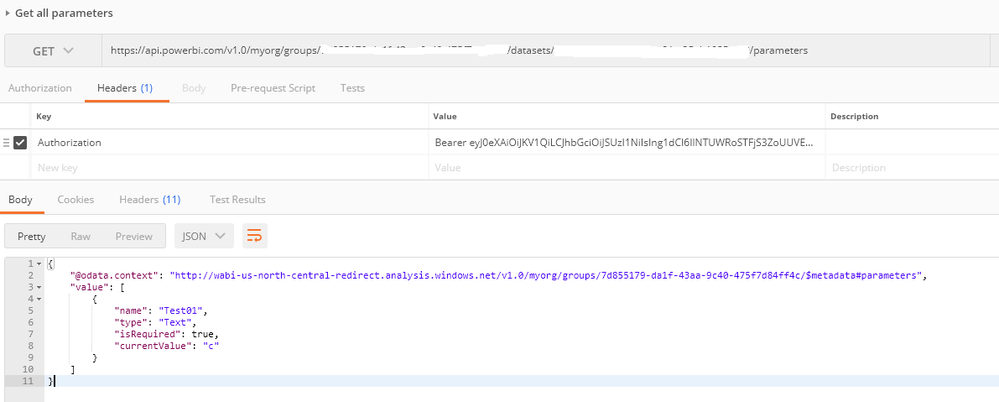
I just verified that I can use the Get all parameters REST API to get available parameters in a dataset.
Note that the query parameter must be referenced/used in at least one of your queries in your dataset, or it won't be returned by the REST API. ![]()
Regards
Hi @navaraj,
I just verified that I can use the Get all parameters REST API to get available parameters in a dataset.
Note that the query parameter must be referenced/used in at least one of your queries in your dataset, or it won't be returned by the REST API. ![]()
Regards
Have you tried for Direct Query connection?? Looks like it only works for Import mode.
Thanks, i was reassigning parameters to variables which are used in query. I just found out that parameters should directly be used in Query.
Check out the April 2026 Power BI update to learn about new features.
If you have recently started exploring Fabric, we'd love to hear how it's going. Your feedback can help with product improvements.
| User | Count |
|---|---|
| 4 | |
| 2 | |
| 1 | |
| 1 | |
| 1 |