Don't miss your chance to take the Fabric Data Engineer (DP-700) exam on us!
Learn moreWe've captured the moments from FabCon & SQLCon that everyone is talking about, and we are bringing them to the community, live and on-demand. Starts on April 14th. Register now
Hi, I am completly new to using the Power BI API.
I looked at the code examples on how to export to powerpoint but I am completly lost on how it works
Export Power BI reports API - Power BI | Microsoft Docs
Does anyone have a working sample I can look at? or can maybe guide me to a working sample?
Solved! Go to Solution.
using Microsoft.PowerBI.Api;
var client = new PowerBIClient(new Uri("https://api.powerbi.com/"), tokenCredentials);
you will need to create the token Credentials by generating the token
Hi @Sil3ntGam3r ,
you can check this link - Embed content in your application for your organization - Power BI | Microsoft Docs
HI @Sil3ntGam3r,
As lbendlin said, it already shared the C# version sample code about the methods to invoke rest API. Are you mean the different programming/script language versions or the whole project source codes?
Bookmark:
Export Power BI report to file (preview)#code-examples
In addition, you can also navigate to the rest API page and click on 'try it' button to use the online version(HTML script) :
Reports - Get Pages In Group#code-try-0
Regards,
Xiaoxin Sheng
Thanks for the reply. Ill check out the online version.
The problem I am having is with the example code.
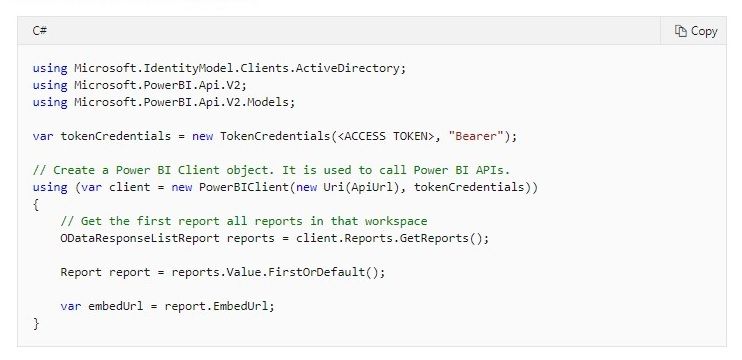
I tried using it, but I get an error with the Client object. It says in the comments that 'Client' is an instance of the Power BI .NET SDK.
But what does that mean to me? How do I declare the Client object in my C# application?
using Microsoft.PowerBI.Api;
var client = new PowerBIClient(new Uri("https://api.powerbi.com/"), tokenCredentials);
you will need to create the token Credentials by generating the token
There is a working example in the link you reference.
Sorry let me rephrase that. I am looking for working source code?
If you have recently started exploring Fabric, we'd love to hear how it's going. Your feedback can help with product improvements.
A new Power BI DataViz World Championship is coming this June! Don't miss out on submitting your entry.
Share feedback directly with Fabric product managers, participate in targeted research studies and influence the Fabric roadmap.
| User | Count |
|---|---|
| 1 | |
| 1 | |
| 1 | |
| 1 | |
| 1 |