Get certified for free when you join Fabric Data Days 2026 and dive into Fabric, Power BI, SQL, AI, and other essential data skills.
Join nowTry your skills in the Power BI Dataviz World Championship! Round one ends June 26. Join now
Hello,
I've done some digging around and I can't find any settings to support embedding a report with the filters pane already expanded. When I embed a report I get this back on the right side of my report
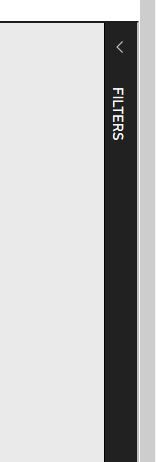
And I'd rather have this view. If there's a setting I can pass in I'd rather like to use it but I can't find one in settings/documentation.
Here's what I'm currently passing into the Javascript API
var config = {
type: 'report',
id: embedReportId,
embedUrl: embedUrl,
filters: @Html.Raw(Model.FilterList),
accessToken: accessToken,
settings: {
filterPaneEnabled: true,
navContentPaneEnabled: true,
localeSettings: {
language: "en",
formatLocale: "en-au"
}
}
};Is there something like "filterPaneExpanded"?
@speedyspeedstar wrote:
Hello,
I've done some digging around and I can't find any settings to support embedding a report with the filters pane already expanded. When I embed a report I get this back on the right side of my report
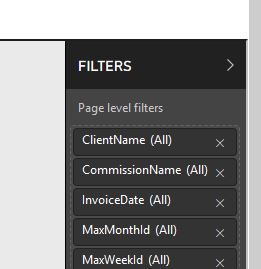
And I'd rather have this view. If there's a setting I can pass in I'd rather like to use it but I can't find one in settings/documentation.
Here's what I'm currently passing into the Javascript API
var config = { type: 'report', id: embedReportId, embedUrl: embedUrl, filters: @Html.Raw(Model.FilterList), accessToken: accessToken, settings: { filterPaneEnabled: true, navContentPaneEnabled: true, localeSettings: { language: "en", formatLocale: "en-au" } } };Is there something like "filterPaneExpanded"?
AFAIK, it is not supported. You can submit your request at the Power BI Ideas and vote it up.
| User | Count |
|---|---|
| 2 | |
| 2 | |
| 1 | |
| 1 | |
| 1 |