Join us at FabCon Atlanta from March 16 - 20, 2026, for the ultimate Fabric, Power BI, AI and SQL community-led event. Save $200 with code FABCOMM.
Register now!The Power BI Data Visualization World Championships is back! It's time to submit your entry. Live now!
Hello,
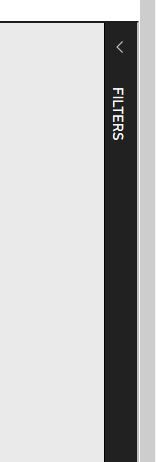
I've done some digging around and I can't find any settings to support embedding a report with the filters pane already expanded. When I embed a report I get this back on the right side of my report
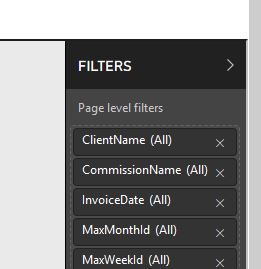
And I'd rather have this view. If there's a setting I can pass in I'd rather like to use it but I can't find one in settings/documentation.
Here's what I'm currently passing into the Javascript API
var config = {
type: 'report',
id: embedReportId,
embedUrl: embedUrl,
filters: @Html.Raw(Model.FilterList),
accessToken: accessToken,
settings: {
filterPaneEnabled: true,
navContentPaneEnabled: true,
localeSettings: {
language: "en",
formatLocale: "en-au"
}
}
};Is there something like "filterPaneExpanded"?
@speedyspeedstar wrote:
Hello,
I've done some digging around and I can't find any settings to support embedding a report with the filters pane already expanded. When I embed a report I get this back on the right side of my report
And I'd rather have this view. If there's a setting I can pass in I'd rather like to use it but I can't find one in settings/documentation.
Here's what I'm currently passing into the Javascript API
var config = { type: 'report', id: embedReportId, embedUrl: embedUrl, filters: @Html.Raw(Model.FilterList), accessToken: accessToken, settings: { filterPaneEnabled: true, navContentPaneEnabled: true, localeSettings: { language: "en", formatLocale: "en-au" } } };Is there something like "filterPaneExpanded"?
AFAIK, it is not supported. You can submit your request at the Power BI Ideas and vote it up.
| User | Count |
|---|---|
| 4 | |
| 2 | |
| 2 | |
| 1 | |
| 1 |