Get certified for free when you join Fabric Data Days 2026 and dive into Fabric, Power BI, SQL, AI, and other essential data skills.
Join nowData Days is here! Join us now for 60+ days of learning, challenges, and connection. Learn more
Hi everyone,
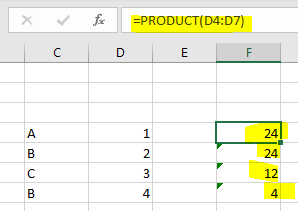
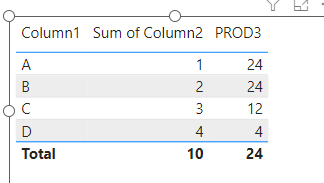
I am struggling DAX PRODUCTX funcction in power bi to have a result same like PRODUCT function in EXCEL.
But unfortunatly didn't get the expected result as showed in excel.
EXCEL
POWER BI
appreciate any help.
Thanks
Solved! Go to Solution.
@hb
Please try this measure. based on your example, the following solution would work but I am not sure about what kind of actual or production data you will be implemeting on. This give an idea 🙂
PROD3 =
CALCULATE(
PRODUCTX( 'Table' , 'Table'[Column2] ),
WINDOW(
0,
REL,
-1,ABS,
SUMMARIZE( ALLSELECTED('Table') , 'Table'[Column1]),
ORDERBY( 'Table'[Column1] )
)
)
⭕ Subscribe and learn Power BI from these videos
⚪ Website ⚪ LinkedIn ⚪ PBI User Group
You are great man.
Thanks for your solution, but when i am aplying it on my project its not working as expected.
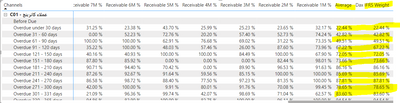
i have the matrix visual with heirarchical data [Channel] & [Due Group] as
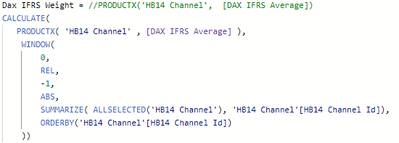
and apply the formula like
but not geeting the result.
any idea in this context ?
Thanks
@hb
If you could replicate a PBIX file with some dummy data and show the same scenario and share the file then I should be able to see the issue.
⭕ Subscribe and learn Power BI from these videos
⚪ Website ⚪ LinkedIn ⚪ PBI User Group
Hello Fowmy,
Can you kindly share the BI datafile for the AR dashboard, I would like to use it for learning purposes. My email address is RichardThomasG@proton.me.
Thank you so much.
@hb
Please try this measure. based on your example, the following solution would work but I am not sure about what kind of actual or production data you will be implemeting on. This give an idea 🙂
PROD3 =
CALCULATE(
PRODUCTX( 'Table' , 'Table'[Column2] ),
WINDOW(
0,
REL,
-1,ABS,
SUMMARIZE( ALLSELECTED('Table') , 'Table'[Column1]),
ORDERBY( 'Table'[Column1] )
)
)
⭕ Subscribe and learn Power BI from these videos
⚪ Website ⚪ LinkedIn ⚪ PBI User Group
Don't miss out on Data Days, June 15 through August 7. Learn Fabric, Power BI, SQL, AI and more.
Check out the May 2026 Power BI update to learn about new features.
| User | Count |
|---|---|
| 2 | |
| 2 | |
| 1 | |
| 1 | |
| 1 |