Don't miss your chance to take the Fabric Data Engineer (DP-600) exam for FREE! Find out how by watching the DP-600 session on-demand now through April 28th.
Learn moreJoin the FabCon + SQLCon recap series. Up next: Power BI, Real-Time Intelligence, IQ and AI, and Data Factory take center stage. All sessions are available on-demand after the live show. Register now
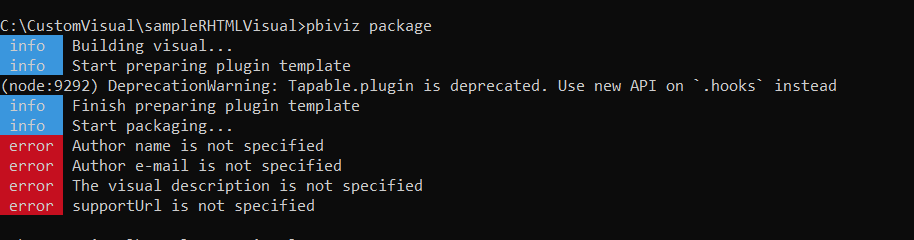
I'm trying to create a custom visual, however while executing pbiviz package I've obtained those errors (see image) and then, the visual is not created..
Any idea in how to solve this problem?Thanks very much!
Solved! Go to Solution.
Hi there,
A packaged visual expects a bit more info. You need to edit your pbiviz.json and fill in the fields specified before the package process will work.
So, let's say your file looks like this (which is pretty much the default after creating):
{
"visual": {
"name": "myVisual",
"displayName": "myVisual",
"guid": "myVisualD7CD469BA41A483C8C1576E59A1D23E3",
"visualClassName": "Visual",
"version": "1.0.0",
"description": "",
"supportUrl": "",
"gitHubUrl": ""
},
"apiVersion": "2.6.0",
"author": {
"name": "",
"email": ""
},
"assets": {
"icon": "assets/icon.png"
},
"externalJS": null,
"style": "style/visual.less",
"capabilities": "capabilities.json",
"dependencies": null,
"stringResources": []
}You need to add values to the author (name and email), description and supportUrl fields, e.g.:
{
"visual": {
"name": "myVisual",
"displayName": "myVisual",
"guid": "myVisualD7CD469BA41A483C8C1576E59A1D23E3",
"visualClassName": "Visual",
"version": "1.0.0",
"description": "My cool visual",
"supportUrl": "https://www.google.com",
"gitHubUrl": ""
},
"apiVersion": "2.6.0",
"author": {
"name": "My Name",
"email": "my.email@email.com"
},
"assets": {
"icon": "assets/icon.png"
},
"externalJS": null,
"style": "style/visual.less",
"capabilities": "capabilities.json",
"dependencies": null,
"stringResources": []
}Obviosuly, you'd be better putting informative values in there, particularly if you want to distribute your visual to other users but this will get you moving.
Good luck!
Daniel
Proud to be a Super User!
On how to ask a technical question, if you really want an answer (courtesy of SQLBI)
Hi there,
A packaged visual expects a bit more info. You need to edit your pbiviz.json and fill in the fields specified before the package process will work.
So, let's say your file looks like this (which is pretty much the default after creating):
{
"visual": {
"name": "myVisual",
"displayName": "myVisual",
"guid": "myVisualD7CD469BA41A483C8C1576E59A1D23E3",
"visualClassName": "Visual",
"version": "1.0.0",
"description": "",
"supportUrl": "",
"gitHubUrl": ""
},
"apiVersion": "2.6.0",
"author": {
"name": "",
"email": ""
},
"assets": {
"icon": "assets/icon.png"
},
"externalJS": null,
"style": "style/visual.less",
"capabilities": "capabilities.json",
"dependencies": null,
"stringResources": []
}You need to add values to the author (name and email), description and supportUrl fields, e.g.:
{
"visual": {
"name": "myVisual",
"displayName": "myVisual",
"guid": "myVisualD7CD469BA41A483C8C1576E59A1D23E3",
"visualClassName": "Visual",
"version": "1.0.0",
"description": "My cool visual",
"supportUrl": "https://www.google.com",
"gitHubUrl": ""
},
"apiVersion": "2.6.0",
"author": {
"name": "My Name",
"email": "my.email@email.com"
},
"assets": {
"icon": "assets/icon.png"
},
"externalJS": null,
"style": "style/visual.less",
"capabilities": "capabilities.json",
"dependencies": null,
"stringResources": []
}Obviosuly, you'd be better putting informative values in there, particularly if you want to distribute your visual to other users but this will get you moving.
Good luck!
Daniel
Proud to be a Super User!
On how to ask a technical question, if you really want an answer (courtesy of SQLBI)
Thanks very much, now it is working!
Check out the April 2026 Power BI update to learn about new features.
If you have recently started exploring Fabric, we'd love to hear how it's going. Your feedback can help with product improvements.
A new Power BI DataViz World Championship is coming this June! Don't miss out on submitting your entry.
| User | Count |
|---|---|
| 2 | |
| 1 | |
| 1 | |
| 1 | |
| 1 |