Get certified for free when you join Fabric Data Days 2026 and dive into Fabric, Power BI, SQL, AI, and other essential data skills.
Join nowJuly 7 - July 17 | Round 2 of the Power BI Dataviz World Championships. Don't miss your chance! Learn more
Hi All,
I cannot find a solution on google or docuementation.
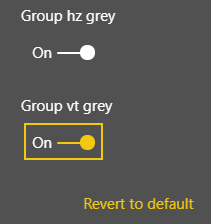
Is it possible to have these 2 or more properties be auto exclusive? So that once I select one of them, the other will be set as false (off) automatically?
So setting the value from code side, once I will find one true, I will set the others to false.
Thanks,
Solved! Go to Solution.
If you are using a settings class based on DataViewObjectsParser from the powerbi-visuals-utils-dataviewutils helper module, you can just alter the properties of that class.
// settings.ts
import { dataViewObjectsParser } from "powerbi-visuals-utils-dataviewutils";
import DataViewObjectsParser = dataViewObjectsParser.DataViewObjectsParser;
export class VisualSettings extends DataViewObjectsParser {
...
}
// visuals.ts
public update(options: VisualUpdateOptions) {
this.settings = <VisualSettings>VisualSettings.parse(options && options.dataViews && options.dataViews[0]);
this.settings.boolean2 = !this.settings.boolean1;
...
}
-JP
You can change the settings of the propety pane directly via your code, so in your case to toggle one boolean based in the status of the other.
I doubt if two toggles that interact which each are that userfriendly. Can't you use a more generic toggle or a dropdown?
-JP
If you are using a settings class based on DataViewObjectsParser from the powerbi-visuals-utils-dataviewutils helper module, you can just alter the properties of that class.
// settings.ts
import { dataViewObjectsParser } from "powerbi-visuals-utils-dataviewutils";
import DataViewObjectsParser = dataViewObjectsParser.DataViewObjectsParser;
export class VisualSettings extends DataViewObjectsParser {
...
}
// visuals.ts
public update(options: VisualUpdateOptions) {
this.settings = <VisualSettings>VisualSettings.parse(options && options.dataViews && options.dataViews[0]);
this.settings.boolean2 = !this.settings.boolean1;
...
}
-JP
Join us in Barcelona for FabCon and SQLCon, the Fabric, Power BI, SQL, and AI community event. Save €200 with code FABCMTY200.
If you love stickers, then you will definitely want to check out our community sticker challenge, Barcelona edition!
Check out the July 2026 Power BI update to learn about new features.
| User | Count |
|---|---|
| 2 | |
| 2 | |
| 1 | |
| 1 | |
| 1 |
| User | Count |
|---|---|
| 4 | |
| 3 | |
| 2 | |
| 2 | |
| 1 |