cancel
Showing results for 
Search instead for 
Did you mean: 

July 7 - July 17 | Round 2 of the Power BI Dataviz World Championships. Don't miss your chance! Learn more

Reply
Anonymous
Not applicable

[Custom Visual] Boolean Object Properties Auto Exclusive

Hi All,


I cannot find a solution on google or docuementation.


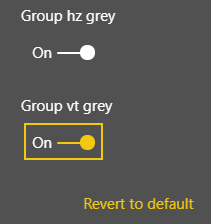
Is it possible to have these 2 or more properties be auto exclusive? So that once I select one of them, the other will be set as false (off) automatically?


Capture.PNG


So setting the value from code side, once I will find one true, I will set the others to false.


Thanks,

1 ACCEPTED SOLUTION
jppp
Continued Contributor

If you are using a settings class based on DataViewObjectsParser from the powerbi-visuals-utils-dataviewutils helper module, you can just alter the properties of that class.


// settings.ts
import { dataViewObjectsParser } from "powerbi-visuals-utils-dataviewutils";

import DataViewObjectsParser = dataViewObjectsParser.DataViewObjectsParser;

export class VisualSettings extends DataViewObjectsParser {
  ...
}

// visuals.ts
public update(options: VisualUpdateOptions) {
  this.settings = <VisualSettings>VisualSettings.parse(options && options.dataViews && options.dataViews[0]);
  this.settings.boolean2 = !this.settings.boolean1;
  ...
}


-JP


View solution in original post

3 REPLIES 3
jppp
Continued Contributor

You can change the settings of the propety pane directly via your code, so in your case to toggle one boolean based in the status of the other.

I doubt if two toggles that interact which each are that userfriendly. Can't you use a more generic toggle or a dropdown?


-JP

Anonymous
Not applicable

So can I change the value assigning it directly via the options.dataview object in the update method? Or should I use a setter function?

About the user interface yes, I know, but I need a visual that only my team will use and it is a super custom visual.

Thanks!!
jppp
Continued Contributor

If you are using a settings class based on DataViewObjectsParser from the powerbi-visuals-utils-dataviewutils helper module, you can just alter the properties of that class.


// settings.ts
import { dataViewObjectsParser } from "powerbi-visuals-utils-dataviewutils";

import DataViewObjectsParser = dataViewObjectsParser.DataViewObjectsParser;

export class VisualSettings extends DataViewObjectsParser {
  ...
}

// visuals.ts
public update(options: VisualUpdateOptions) {
  this.settings = <VisualSettings>VisualSettings.parse(options && options.dataViews && options.dataViews[0]);
  this.settings.boolean2 = !this.settings.boolean1;
  ...
}


-JP


Helpful resources

Announcements
FabCon and SQLCon Barcelona 2026

FabCon & SQLCon – Barcelona 2026

Join us in Barcelona for FabCon and SQLCon, the Fabric, Power BI, SQL, and AI community event. Save €200 with code FABCMTY200.

July Power BI Update Carousel

Power BI Monthly Update - July 2026

Check out the July 2026 Power BI update to learn about new features.

60 days of Data Days Carousel

Data Days 2026

Join Data Days 2026: 60 days of free live/on-demand sessions, challenges, study groups, and certification opportunities.

Power BI DataViz World Championships carousel

Power BI DataViz World Championships - June 2026

A new Power BI DataViz World Championship is coming this June! Don't miss out on submitting your entry.