Learn from the best! Meet the four finalists headed to the FINALS of the Power BI Dataviz World Championships! Register now
Hi
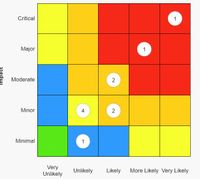
I need to be able to create a matrix like this which plots a value inside a matrix based on its score.
Could anyone offer some advice as to whether this would be possible and how it can be done?
Many Thanks
Solved! Go to Solution.
Hi @KG1,
I don't think you can do customize with matrix plot features.
For your scenario, I'd like to suggest you write a measure with if statement to check current row and column label to find out the score, then you can replace this score to other values based on condition.
Measure =
VAR currRowLable =
SELECTEDVALUE ( Table[Row] )
VAR currColLable =
SELECTEDVALUE ( Table[Column] )
VAR _score =
CALCULATE (
SUM ( Table[Score] ),
FILTER (
ALLSELECTED ( Table ),
[Column] IN currColLable
&& [Row] IN currRowLable
)
)
RETURN
IF ( _score > 10, 2, IF ( _score < 10 && _score > 5, 1, 0 ) )
Regards,
Xiaoxin Sheng
Hi @KG1,
I don't think you can do customize with matrix plot features.
For your scenario, I'd like to suggest you write a measure with if statement to check current row and column label to find out the score, then you can replace this score to other values based on condition.
Measure =
VAR currRowLable =
SELECTEDVALUE ( Table[Row] )
VAR currColLable =
SELECTEDVALUE ( Table[Column] )
VAR _score =
CALCULATE (
SUM ( Table[Score] ),
FILTER (
ALLSELECTED ( Table ),
[Column] IN currColLable
&& [Row] IN currRowLable
)
)
RETURN
IF ( _score > 10, 2, IF ( _score < 10 && _score > 5, 1, 0 ) )
Regards,
Xiaoxin Sheng
A new Power BI DataViz World Championship is coming this June! Don't miss out on submitting your entry.
Share feedback directly with Fabric product managers, participate in targeted research studies and influence the Fabric roadmap.
| User | Count |
|---|---|
| 2 | |
| 1 | |
| 1 | |
| 1 | |
| 1 |
| User | Count |
|---|---|
| 4 | |
| 2 | |
| 2 | |
| 2 | |
| 2 |