Don't miss your chance to take the Fabric Data Engineer (DP-600) exam for FREE! Find out how by watching the DP-600 session on-demand now through April 28th.
Learn moreJoin the FabCon + SQLCon recap series. Up next: Power BI, Real-Time Intelligence, IQ and AI, and Data Factory take center stage. All sessions are available on-demand after the live show. Register now
hello, I have a table consumption as follow:
Transformer DAY KVA%
1 15102017 80
1 16102017 40
1 17102017 60
2 15102017 40
2 16102017 20
2 17102017 100
3 15102017 60
3 16102017 100
3 17102017 120
4 15102017 140
4 16102017 70
4 17102017 90
5 15102017 10
5 16102017 20
5 17102017 90
I want first to get the average of KVA% column for each transformer. I did the below mesure:
AvgKVA%=AVERAGEX('Transformer',CALCULATE(AVERAGE('Transformer'[KVA%]))) and I got the below info:
Transformer AvgKVA%
1 60
2 53,33
3 93,33
4 100
5 40
Now I would like to make cake graph that tells me AvgKVA%>80 and 50<AvgKVA%<=80 and AvgKVA%<=50.
In the example will be:
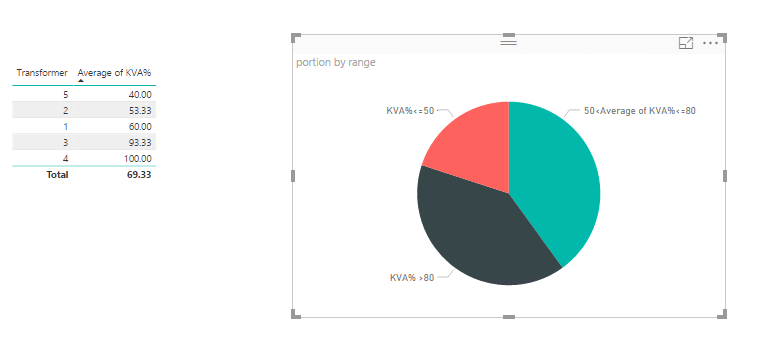
We have 2 transformer with AvgKVA%>80, 2 transformer with AvgKVA% between 50 and 80 and 1 transformer AvgKVA%<=50.
Then I would like to represent as a sectorial graph saying
40% -> KVA% >80
40% -> 50<Average of KVA%<=80
20% -> KVA%<=50
Solved! Go to Solution.
@Anonymous wrote:
hello, I have a table consumption as follow:
Transformer DAY KVA%
1 15102017 80
1 16102017 40
1 17102017 60
2 15102017 40
2 16102017 20
2 17102017 100
3 15102017 60
3 16102017 100
3 17102017 120
4 15102017 140
4 16102017 70
4 17102017 90
5 15102017 10
5 16102017 20
5 17102017 90
I want first to get the average of KVA% column for each transformer. I did the below mesure:
AvgKVA%=AVERAGEX('Transformer',CALCULATE(AVERAGE('Transformer'[KVA%]))) and I got the below info:
Transformer AvgKVA%
1 60
2 53,33
3 93,33
4 100
5 40
Now I would like to make cake graph that tells me AvgKVA%>80 and 50<AvgKVA%<=80 and AvgKVA%<=50.
In the example will be:We have 2 transformer with AvgKVA%>80, 2 transformer with AvgKVA% between 50 and 80 and 1 transformer AvgKVA%<=50.
Then I would like to represent as a sectorial graph saying40% -> KVA% >80
40% -> 50<Average of KVA%<=80
20% -> KVA%<=50
@Anonymous
You need to create an auxiliary table and create a measure as below. See more details in the attached pbix file.
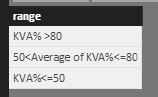
portion =
VAR summizedTBL =
SUMMARIZE (
Transformer,
Transformer[Transformer],
"Average of KVA", AVERAGE ( Transformer[KVA%] )
)
VAR summizedTBL2 =
ADDCOLUMNS (
summizedTBL,
"range", SWITCH (
TRUE (),
[Average of KVA] > 80, "KVA% >80",
[Average of KVA] <= 50, "KVA%<=50",
"50<Average of KVA%<=80"
)
)
RETURN
COUNTROWS ( FILTER ( summizedTBL2, [range] = MAX ( range[range] ) ) )
@Anonymous wrote:
hello, I have a table consumption as follow:
Transformer DAY KVA%
1 15102017 80
1 16102017 40
1 17102017 60
2 15102017 40
2 16102017 20
2 17102017 100
3 15102017 60
3 16102017 100
3 17102017 120
4 15102017 140
4 16102017 70
4 17102017 90
5 15102017 10
5 16102017 20
5 17102017 90
I want first to get the average of KVA% column for each transformer. I did the below mesure:
AvgKVA%=AVERAGEX('Transformer',CALCULATE(AVERAGE('Transformer'[KVA%]))) and I got the below info:
Transformer AvgKVA%
1 60
2 53,33
3 93,33
4 100
5 40
Now I would like to make cake graph that tells me AvgKVA%>80 and 50<AvgKVA%<=80 and AvgKVA%<=50.
In the example will be:We have 2 transformer with AvgKVA%>80, 2 transformer with AvgKVA% between 50 and 80 and 1 transformer AvgKVA%<=50.
Then I would like to represent as a sectorial graph saying40% -> KVA% >80
40% -> 50<Average of KVA%<=80
20% -> KVA%<=50
@Anonymous
You need to create an auxiliary table and create a measure as below. See more details in the attached pbix file.
portion =
VAR summizedTBL =
SUMMARIZE (
Transformer,
Transformer[Transformer],
"Average of KVA", AVERAGE ( Transformer[KVA%] )
)
VAR summizedTBL2 =
ADDCOLUMNS (
summizedTBL,
"range", SWITCH (
TRUE (),
[Average of KVA] > 80, "KVA% >80",
[Average of KVA] <= 50, "KVA%<=50",
"50<Average of KVA%<=80"
)
)
RETURN
COUNTROWS ( FILTER ( summizedTBL2, [range] = MAX ( range[range] ) ) )
just regarding to this topic, I have 2 questions.
How can I do to give to users to change the nondition, it means that is not going to be like this:
40% -> KVA% >80
40% -> 50<Average of KVA%<=80
20% -> KVA%<=50
It will be
KVA% >x
y<Average of KVA%<=x
KVA%<=z
So I can gice user to input x, y and z. Is there any way to do it?
The 2nd one, is that in the report that you sent, if i select a section in the pie chart, The tble that you did with transformer and Average of KVA% show the same thin when it should show the transformers with the section of pie chart selected. I tried to do a relation between range table and Transformer table using a range, but it looks that is not possible doing with a mesure,
That is great. Thanks a lot.
Check out the April 2026 Power BI update to learn about new features.
If you have recently started exploring Fabric, we'd love to hear how it's going. Your feedback can help with product improvements.
A new Power BI DataViz World Championship is coming this June! Don't miss out on submitting your entry.
| User | Count |
|---|---|
| 2 | |
| 1 | |
| 1 | |
| 1 | |
| 1 |
| User | Count |
|---|---|
| 8 | |
| 8 | |
| 4 | |
| 3 | |
| 2 |