cancel
Showing results for 
Search instead for 
Did you mean: 

Learn from the best! Meet the four finalists headed to the FINALS of the Power BI Dataviz World Championships! Register now

Reply
mroot
Frequent Visitor

Conditional Formating Power BI Custom Visual

Hi all,


I am trying to implement the condition formatting that was released not too long ago.


I am scratching my head about one thing I am seeing and was wondering if anyone can point me in the right direction.


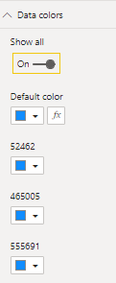
When adding the code from the documention, the conditional function button (fx) gets appended to each data point in the format panel. 

 mroot_0-1616187926397.png   

Since conditionally formating one data point will apply to them all, it would make sense to make it look like what the 'stacked bar chart' is doing which is only adding it to the first data point:


mroot_2-1616188371521.png


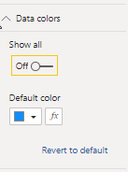
Even better would be to add the 'show all' toggle so the decault color represents all the data points:

mroot_1-1616188091149.png


Does anyone know how to achieve these two goals?


Thanks,


Matt


1 REPLY 1
Anonymous
Not applicable

Hi @mroot ,

From the following paragraph from the official documentation, it seems that the function you expect is not yet available. Maybe you can go to Github for help.


We recommend that you don’t use conditional formatting with series. Instead, you should allow customers to format each series individually, making it easy to visually distinguish between series. Most out-of-the-box visuals with series, share this approach.


Best Regards

Helpful resources

Announcements
Join our Fabric User Panel

Join our Fabric User Panel

Share feedback directly with Fabric product managers, participate in targeted research studies and influence the Fabric roadmap.

February Power BI Update Carousel

Power BI Monthly Update - February 2026

Check out the February 2026 Power BI update to learn about new features.

FabCon Atlanta 2026 carousel

FabCon Atlanta 2026

Join us at FabCon Atlanta, March 16-20, for the ultimate Fabric, Power BI, AI and SQL community-led event. Save $200 with code FABCOMM.