cancel
Showing results for 
Search instead for 
Did you mean: 

The Power BI Data Visualization World Championships is back! It's time to submit your entry. Live now!

Reply
danjdo
Frequent Visitor

Comparing values based on slicer selections

Hello, I am very new to Power BI and find some tasks difficult. 


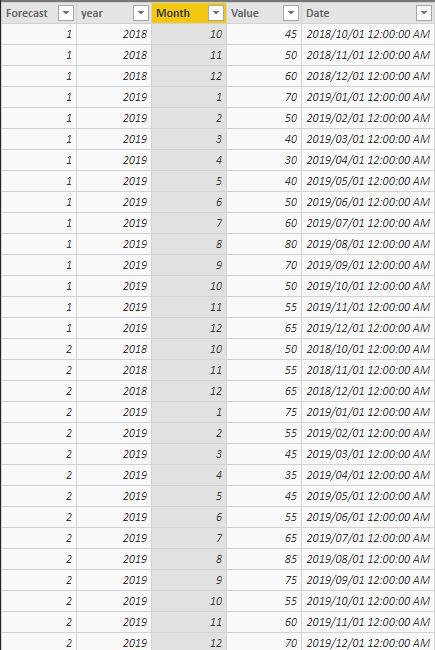
I have a single table with multiple forecasts that are timestamped (in this example simplified to just be called forecast 1, 2 etc.). Each forecast will contain the forecast periods (date, year, month). 

I need the user to choose two forecast periods (most likley via two seperate drop downs) and then have a chart and table compare the two forecast periods. 


image.png

Example: Dropdown 2 user chooses Forecast 2, Dropddown 1 user choose Forecast 1. 

Chart shows line graph with the two forecasts, value over month/year

then a table that caclulates the delta between each of the year/month values. 


I've looked online for about 3 hours but can't seem to find a solution. This is something that would take 10 minutes in Excel but seems much more complicated in Power BI. 


Please help. I am on my knees!


Daniel

1 REPLY 1
shishir999
Helper II
Helper II

1. Try by Creating a duplicate dataset.

2. Display the value on the table chart from both dataset.

3. Add 2 slicers ie. 1st as from 1st dataset and 2nd from duplicate dataset on Forecast field.


SG

Helpful resources

Announcements
FabCon Atlanta 2026 carousel

FabCon Atlanta 2026

Join us at FabCon Atlanta, March 16-20, for the ultimate Fabric, Power BI, AI and SQL community-led event. Save $200 with code FABCOMM.