cancel
Showing results for 
Search instead for 
Did you mean: 

July 28 - August 9 | Final Round of the Power BI Dataviz World Championships. This is your chance. Learn more

Reply
SysLostInBI
Frequent Visitor

Combining multiple result sets from JSON

Can someone help me to understand how I have to process this json result from my IP.


  "result": [
    {
      "metricId": "actionsPerSession",
      "data": [
        {
          "dimensions": [
            "APPLICATION-A"
          ],
          "dimensionMap": {
            "dt.entity.application": "APPLICATION-A"
          },
          "timestamps": [
            1614556800000,
            1617235200000,
            1619827200000,
            1622505600000,
            1625097600000
          ],
          "values": [
            21.28073384020771,
            47.06336163296851,
            11.023587012711282,
            10.320278490922409,
            10.740145332074341
          ]
        }
      ]
    },
    {
      "metricId": "actionCount",
      "data": [
        {
          "dimensions": [
            "APPLICATION-A"
          ],
          "dimensionMap": {
            "dt.entity.application": "APPLICATION-A"
          },
          "timestamps": [
            1614556800000,
            1617235200000,
            1619827200000,
            1622505600000,
            1625097600000
          ],
          "values": [
            6707,
            28477.333333333332,
            144980,
            859878.6666666666,
            798342.6666666666
          ]
        }
      ]
    }
  ]


The end-result should look something like:

application | timestamp | action-per-session | actionCount |
APPLICATION-A | 1614556800000 | 21.28073384020771 |6707|
APPLICATION-A | 1617235200000 | 47.06336163296851 |28477.333333333332|
Any help is much appreciated.


1 ACCEPTED SOLUTION
Anonymous
Not applicable

Hi @SysLostInBI 

It seems that your json code will return many lists. Firsly, get data in Power BI Desktop by Json connector to connect to the Json File or web to connect to the API to get Json File. Then you need to transform the json file to Power BI Table. 

For reference: Converting JSON data into PowerBI table

Using Power BI with JSON Data Sources and Files

When you connect to Json, you need to transform your table to the result as below. 
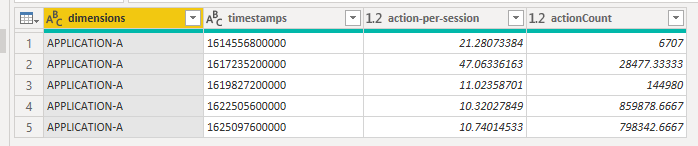
2.png

Here I get data from Json to have a test.


let
    Source = Json.Document(File.Contents("......")),
    result = Source[result],
    result1 = result{0},
    #"Converted to Table" = Record.ToTable(result1),
#"Extracted Values" = Table.TransformColumns(#"Converted to Table", {"Value", each Text.Combine(List.Transform(_, Text.From), ","), type text}),
#"Split Column by Delimiter" = Table.SplitColumn(#"Extracted Values", "Value", Splitter.SplitTextByDelimiter(",", QuoteStyle.Csv), {"Value.1", "Value.2", "Value.3", "Value.4", "Value.5"}),
#"Changed Type" = Table.TransformColumnTypes(#"Split Column by Delimiter",{{"Value.1", type text}, {"Value.2", type number}, {"Value.3", type number}, {"Value.4", type number}, {"Value.5", type number}}),
#"Transposed Table" = Table.Transpose(#"Changed Type"),
#"Promoted Headers" = Table.PromoteHeaders(#"Transposed Table", [PromoteAllScalars=true]),
#"Changed Type1" = Table.TransformColumnTypes(#"Promoted Headers",{{"dimensions", type text}, {"timestamps", Int64.Type}, {"action-per-session", type number}, {"actionCount", type number}}),
#"Filled Down" = Table.FillDown(#"Changed Type1",{"dimensions"}),
    #"Changed Type2" = Table.TransformColumnTypes(#"Filled Down",{{"timestamps", type text}}),
    #"Merged Columns" = Table.CombineColumns(Table.TransformColumnTypes(#"Changed Type2", {{"action-per-session", type text}, {"actionCount", type text}}, "en-US"),{"dimensions", "timestamps", "action-per-session", "actionCount"},Combiner.CombineTextByDelimiter("|", QuoteStyle.None),"Merged")
in
#"Merged Columns"


Finally Select all rows , right click and use merge function in Power Query.
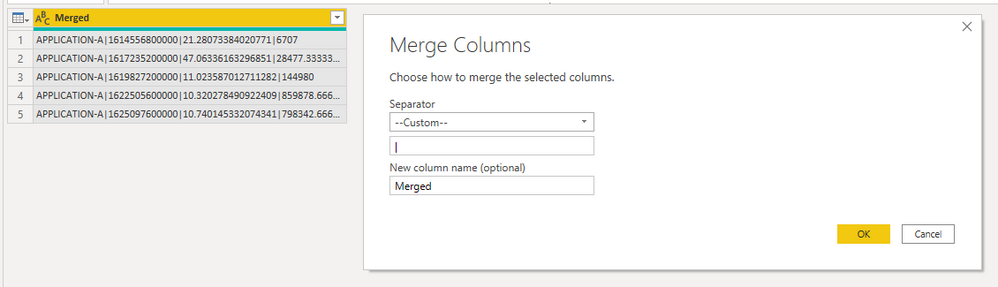
3.png

Best Regards,

Rico Zhou


If this post helps, then please consider Accept it as the solution to help the other members find it more quickly. 


View solution in original post

1 REPLY 1
Anonymous
Not applicable

Hi @SysLostInBI 

It seems that your json code will return many lists. Firsly, get data in Power BI Desktop by Json connector to connect to the Json File or web to connect to the API to get Json File. Then you need to transform the json file to Power BI Table. 

For reference: Converting JSON data into PowerBI table

Using Power BI with JSON Data Sources and Files

When you connect to Json, you need to transform your table to the result as below. 

2.png

Here I get data from Json to have a test.


let
    Source = Json.Document(File.Contents("......")),
    result = Source[result],
    result1 = result{0},
    #"Converted to Table" = Record.ToTable(result1),
#"Extracted Values" = Table.TransformColumns(#"Converted to Table", {"Value", each Text.Combine(List.Transform(_, Text.From), ","), type text}),
#"Split Column by Delimiter" = Table.SplitColumn(#"Extracted Values", "Value", Splitter.SplitTextByDelimiter(",", QuoteStyle.Csv), {"Value.1", "Value.2", "Value.3", "Value.4", "Value.5"}),
#"Changed Type" = Table.TransformColumnTypes(#"Split Column by Delimiter",{{"Value.1", type text}, {"Value.2", type number}, {"Value.3", type number}, {"Value.4", type number}, {"Value.5", type number}}),
#"Transposed Table" = Table.Transpose(#"Changed Type"),
#"Promoted Headers" = Table.PromoteHeaders(#"Transposed Table", [PromoteAllScalars=true]),
#"Changed Type1" = Table.TransformColumnTypes(#"Promoted Headers",{{"dimensions", type text}, {"timestamps", Int64.Type}, {"action-per-session", type number}, {"actionCount", type number}}),
#"Filled Down" = Table.FillDown(#"Changed Type1",{"dimensions"}),
    #"Changed Type2" = Table.TransformColumnTypes(#"Filled Down",{{"timestamps", type text}}),
    #"Merged Columns" = Table.CombineColumns(Table.TransformColumnTypes(#"Changed Type2", {{"action-per-session", type text}, {"actionCount", type text}}, "en-US"),{"dimensions", "timestamps", "action-per-session", "actionCount"},Combiner.CombineTextByDelimiter("|", QuoteStyle.None),"Merged")
in
#"Merged Columns"


Finally Select all rows , right click and use merge function in Power Query.

3.png

Best Regards,

Rico Zhou


If this post helps, then please consider Accept it as the solution to help the other members find it more quickly. 


Helpful resources

Announcements
FabCon and SQLCon Barcelona 2026

FabCon & SQLCon – Barcelona 2026

Join us in Barcelona for FabCon and SQLCon, the Fabric, Power BI, SQL, and AI community event. Save €200 with code FABCMTY200.

Fabric Community Sticker Design Challenge Barcelona Carousel

Fabric Community Sticker Challenge - Barcelona 2026

If you love stickers, then you will definitely want to check out our community sticker challenge, Barcelona edition!

July Power BI Update Carousel

Power BI Monthly Update - July 2026

Check out the July 2026 Power BI update to learn about new features.

Power BI DataViz World Championships carousel

Power BI DataViz World Championships - June 2026

A new Power BI DataViz World Championship is coming this June! Don't miss out on submitting your entry.