cancel
Showing results for 
Search instead for 
Did you mean: 

The Power BI Data Visualization World Championships is back! Get ahead of the game and start preparing now! Learn more

Reply
SysLostInBI
Frequent Visitor

Combining multiple result sets from JSON

Can someone help me to understand how I have to process this json result from my IP.


  "result": [
    {
      "metricId": "actionsPerSession",
      "data": [
        {
          "dimensions": [
            "APPLICATION-A"
          ],
          "dimensionMap": {
            "dt.entity.application": "APPLICATION-A"
          },
          "timestamps": [
            1614556800000,
            1617235200000,
            1619827200000,
            1622505600000,
            1625097600000
          ],
          "values": [
            21.28073384020771,
            47.06336163296851,
            11.023587012711282,
            10.320278490922409,
            10.740145332074341
          ]
        }
      ]
    },
    {
      "metricId": "actionCount",
      "data": [
        {
          "dimensions": [
            "APPLICATION-A"
          ],
          "dimensionMap": {
            "dt.entity.application": "APPLICATION-A"
          },
          "timestamps": [
            1614556800000,
            1617235200000,
            1619827200000,
            1622505600000,
            1625097600000
          ],
          "values": [
            6707,
            28477.333333333332,
            144980,
            859878.6666666666,
            798342.6666666666
          ]
        }
      ]
    }
  ]


The end-result should look something like:

application | timestamp | action-per-session | actionCount |
APPLICATION-A | 1614556800000 | 21.28073384020771 |6707|
APPLICATION-A | 1617235200000 | 47.06336163296851 |28477.333333333332|
Any help is much appreciated.


1 ACCEPTED SOLUTION
Anonymous
Not applicable

Hi @SysLostInBI 

It seems that your json code will return many lists. Firsly, get data in Power BI Desktop by Json connector to connect to the Json File or web to connect to the API to get Json File. Then you need to transform the json file to Power BI Table. 

For reference: Converting JSON data into PowerBI table

Using Power BI with JSON Data Sources and Files

When you connect to Json, you need to transform your table to the result as below. 
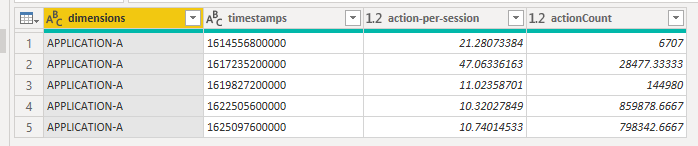
2.png

Here I get data from Json to have a test.


let
    Source = Json.Document(File.Contents("......")),
    result = Source[result],
    result1 = result{0},
    #"Converted to Table" = Record.ToTable(result1),
#"Extracted Values" = Table.TransformColumns(#"Converted to Table", {"Value", each Text.Combine(List.Transform(_, Text.From), ","), type text}),
#"Split Column by Delimiter" = Table.SplitColumn(#"Extracted Values", "Value", Splitter.SplitTextByDelimiter(",", QuoteStyle.Csv), {"Value.1", "Value.2", "Value.3", "Value.4", "Value.5"}),
#"Changed Type" = Table.TransformColumnTypes(#"Split Column by Delimiter",{{"Value.1", type text}, {"Value.2", type number}, {"Value.3", type number}, {"Value.4", type number}, {"Value.5", type number}}),
#"Transposed Table" = Table.Transpose(#"Changed Type"),
#"Promoted Headers" = Table.PromoteHeaders(#"Transposed Table", [PromoteAllScalars=true]),
#"Changed Type1" = Table.TransformColumnTypes(#"Promoted Headers",{{"dimensions", type text}, {"timestamps", Int64.Type}, {"action-per-session", type number}, {"actionCount", type number}}),
#"Filled Down" = Table.FillDown(#"Changed Type1",{"dimensions"}),
    #"Changed Type2" = Table.TransformColumnTypes(#"Filled Down",{{"timestamps", type text}}),
    #"Merged Columns" = Table.CombineColumns(Table.TransformColumnTypes(#"Changed Type2", {{"action-per-session", type text}, {"actionCount", type text}}, "en-US"),{"dimensions", "timestamps", "action-per-session", "actionCount"},Combiner.CombineTextByDelimiter("|", QuoteStyle.None),"Merged")
in
#"Merged Columns"


Finally Select all rows , right click and use merge function in Power Query.
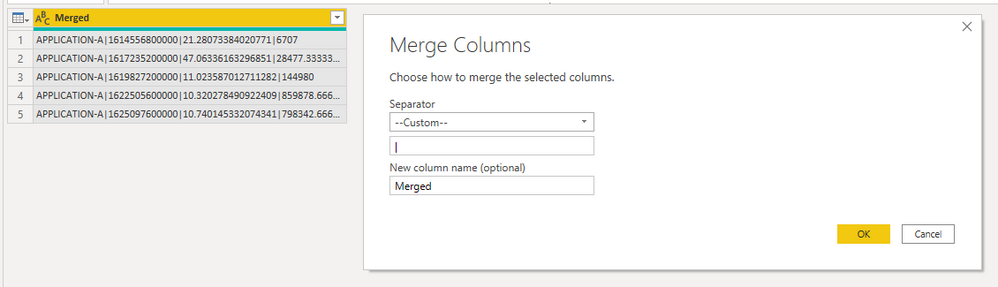
3.png

Best Regards,

Rico Zhou


If this post helps, then please consider Accept it as the solution to help the other members find it more quickly. 


View solution in original post

1 REPLY 1
Anonymous
Not applicable

Hi @SysLostInBI 

It seems that your json code will return many lists. Firsly, get data in Power BI Desktop by Json connector to connect to the Json File or web to connect to the API to get Json File. Then you need to transform the json file to Power BI Table. 

For reference: Converting JSON data into PowerBI table

Using Power BI with JSON Data Sources and Files

When you connect to Json, you need to transform your table to the result as below. 

2.png

Here I get data from Json to have a test.


let
    Source = Json.Document(File.Contents("......")),
    result = Source[result],
    result1 = result{0},
    #"Converted to Table" = Record.ToTable(result1),
#"Extracted Values" = Table.TransformColumns(#"Converted to Table", {"Value", each Text.Combine(List.Transform(_, Text.From), ","), type text}),
#"Split Column by Delimiter" = Table.SplitColumn(#"Extracted Values", "Value", Splitter.SplitTextByDelimiter(",", QuoteStyle.Csv), {"Value.1", "Value.2", "Value.3", "Value.4", "Value.5"}),
#"Changed Type" = Table.TransformColumnTypes(#"Split Column by Delimiter",{{"Value.1", type text}, {"Value.2", type number}, {"Value.3", type number}, {"Value.4", type number}, {"Value.5", type number}}),
#"Transposed Table" = Table.Transpose(#"Changed Type"),
#"Promoted Headers" = Table.PromoteHeaders(#"Transposed Table", [PromoteAllScalars=true]),
#"Changed Type1" = Table.TransformColumnTypes(#"Promoted Headers",{{"dimensions", type text}, {"timestamps", Int64.Type}, {"action-per-session", type number}, {"actionCount", type number}}),
#"Filled Down" = Table.FillDown(#"Changed Type1",{"dimensions"}),
    #"Changed Type2" = Table.TransformColumnTypes(#"Filled Down",{{"timestamps", type text}}),
    #"Merged Columns" = Table.CombineColumns(Table.TransformColumnTypes(#"Changed Type2", {{"action-per-session", type text}, {"actionCount", type text}}, "en-US"),{"dimensions", "timestamps", "action-per-session", "actionCount"},Combiner.CombineTextByDelimiter("|", QuoteStyle.None),"Merged")
in
#"Merged Columns"


Finally Select all rows , right click and use merge function in Power Query.

3.png

Best Regards,

Rico Zhou


If this post helps, then please consider Accept it as the solution to help the other members find it more quickly. 


Helpful resources

Announcements
Power BI DataViz World Championships

Power BI Dataviz World Championships

The Power BI Data Visualization World Championships is back! Get ahead of the game and start preparing now!

December 2025 Power BI Update Carousel

Power BI Monthly Update - December 2025

Check out the December 2025 Power BI Holiday Recap!

FabCon Atlanta 2026 carousel

FabCon Atlanta 2026

Join us at FabCon Atlanta, March 16-20, for the ultimate Fabric, Power BI, AI and SQL community-led event. Save $200 with code FABCOMM.