cancel
Showing results for 
Search instead for 
Did you mean: 

The Power BI Data Visualization World Championships is back! It's time to submit your entry. Live now!

Reply
AzaharoddinSk
Frequent Visitor

Changing the content in Layout file

Hi,


I tried to change some content in the LAYOUT file through Powershell Script, but I am unable to make any changes on that file, Can anyone help me with the solution. 


Note: Content in the Layout file should change with the Powershell script.

4 REPLIES 4
lbendlin
Super User
Super User

What type of changes are you planning to make?  The file format is not documented and liable to change at any time.

Hi @lbendlin
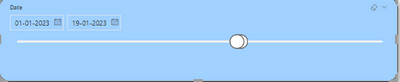
The scenario is like this, In the report having a Slider slicer that is like the start date is 2019/01/01 and the end date is 2024/12/31, I want to change the dates in a layout file like start 2023/01/01 and the end date is today's date. 


AzaharoddinSk_0-1674123563614.png


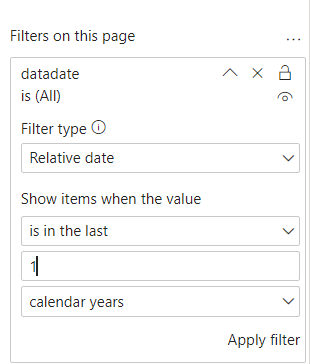
You should be able to use a preset filter for that, like this


lbendlin_0-1674302504371.png


Hi @lbendlin ,


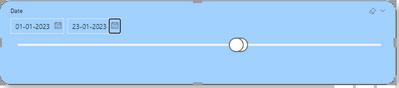
I tried with your solution but it is not working, In that slider has the 3yrs past data and 1yr forecast data and when I open that page it should only display starting of that month(the present month that is 01 January 2023)  and end date is today's date like below i mentioned the image. 


AzaharoddinSk_0-1674454496288.png


Helpful resources

Announcements
Power BI DataViz World Championships

Power BI Dataviz World Championships

The Power BI Data Visualization World Championships is back! It's time to submit your entry.

January Power BI Update Carousel

Power BI Monthly Update - January 2026

Check out the January 2026 Power BI update to learn about new features.

FabCon Atlanta 2026 carousel

FabCon Atlanta 2026

Join us at FabCon Atlanta, March 16-20, for the ultimate Fabric, Power BI, AI and SQL community-led event. Save $200 with code FABCOMM.