Get certified for free when you join Fabric Data Days 2026 and dive into Fabric, Power BI, SQL, AI, and other essential data skills.
Join nowData Days is here! Join us now for 60+ days of learning, challenges, and connection. Learn more
Hello,
I have followed the documentation for updated a datasource in a spcefic group. https://docs.microsoft.com/en-us/rest/api/power-bi/datasets/updatedatasourcesingroup#datasource but i still get an error. My body is set up properly and I have checked the spelling of the database and server. All I want to do is change Azure SQL DBs.
{
"updateDetails": [
{
"datasourceSelector": {
"datasourceType": "Sql",
"connectionDetails": {
"server": "server1.database.windows.net",
"database": "database1"
}
},
"connectionDetails": {
"server": "server2.database.windows.net",
"database": "database2"
}
}
]
}
{
"error": {
"code": "InvalidRequest",
"message": "Operation is not supported for selector #44"
}
}
Hi @TexasBI ,
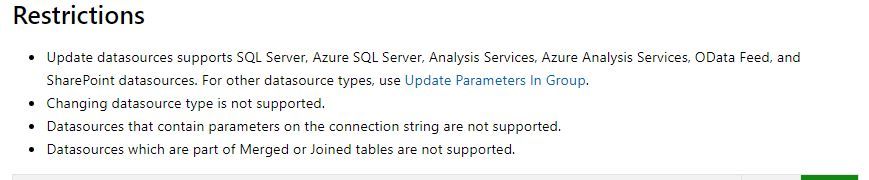
Could you please make sure that your data source doesn't have any of the points listed in the restriction ?
Hi,
@TexasBI did you manage to solve the problem in the end?
Im struggling with the same issue. For some datasources my code works just fine, but in some cases it fails just like yours. I could use a hand.
Cheers,
Bence
unfortunently no. I think we ended up re building the pbix file becasue we think it got corrupted.
Don't miss out on Data Days, June 15 through August 7. Learn Fabric, Power BI, SQL, AI and more.
Check out the May 2026 Power BI update to learn about new features.
| User | Count |
|---|---|
| 2 | |
| 2 | |
| 1 | |
| 1 | |
| 1 |