Don't miss your chance to take the Fabric Data Engineer (DP-600) exam for FREE! Find out how by attending the DP-600 session on April 23rd (pacific time), live or on-demand.
Learn moreNext up in the FabCon + SQLCon recap series: The roadmap for Microsoft SQL and Maximizing Developer experiences in Fabric. All sessions are available on-demand after the live show. Register now
Hello,
I have followed the documentation for updated a datasource in a spcefic group. https://docs.microsoft.com/en-us/rest/api/power-bi/datasets/updatedatasourcesingroup#datasource but i still get an error. My body is set up properly and I have checked the spelling of the database and server. All I want to do is change Azure SQL DBs.
{
"updateDetails": [
{
"datasourceSelector": {
"datasourceType": "Sql",
"connectionDetails": {
"server": "server1.database.windows.net",
"database": "database1"
}
},
"connectionDetails": {
"server": "server2.database.windows.net",
"database": "database2"
}
}
]
}
{
"error": {
"code": "InvalidRequest",
"message": "Operation is not supported for selector #44"
}
}
Hi @TexasBI ,
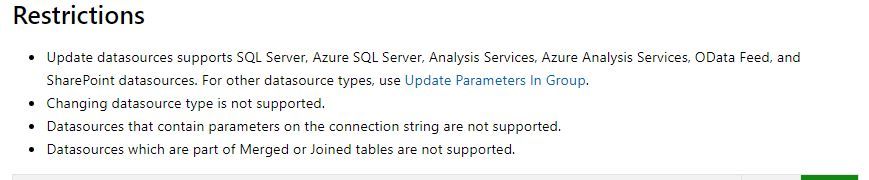
Could you please make sure that your data source doesn't have any of the points listed in the restriction ?
Hi,
@TexasBI did you manage to solve the problem in the end?
Im struggling with the same issue. For some datasources my code works just fine, but in some cases it fails just like yours. I could use a hand.
Cheers,
Bence
unfortunently no. I think we ended up re building the pbix file becasue we think it got corrupted.
If you have recently started exploring Fabric, we'd love to hear how it's going. Your feedback can help with product improvements.
A new Power BI DataViz World Championship is coming this June! Don't miss out on submitting your entry.
Share feedback directly with Fabric product managers, participate in targeted research studies and influence the Fabric roadmap.
| User | Count |
|---|---|
| 1 | |
| 1 | |
| 1 | |
| 1 | |
| 1 |
| User | Count |
|---|---|
| 5 | |
| 4 | |
| 3 | |
| 3 | |
| 2 |