This is best Fabric, Power BI, SQL and AI community event. How do we know? The last event sold out! Save €200 with code FABCMTY200.
Register nowA new Data Days event is coming soon! This time we’re going bigger than ever. Fabric, Power BI, SQL, AI and more. Don't miss out.
I have this issue, I am having a Reveneue KPI thats comprised of 3 components(each is a separate measure). I want my bar chart to show the revenue as total in first layer of hierarchy. and want to display each component revenue at subsequent node of hierarchy.
like node 0 -> total revenue
node 1-> component 1 revenue
node 2-> component 2 revenue
node 3-> component 3 revenue
Please guide how can we do it?
Thanks in advance,
Sana
Solved! Go to Solution.
Thanks everyone, we acheived the solution using Switch function and added component type table as selector for selecting one component type or the other.
@sana_sagheer wrote:
I have this issue, I am having a Reveneue KPI thats comprised of 3 components(each is a separate measure). I want my bar chart to show the revenue as total in first layer of hierarchy. and want to display each component revenue at subsequent node of hierarchy.
like node 0 -> total revenue
node 1-> component 1 revenuenode 2-> component 2 revenue
node 3-> component 3 revenue
Please guide how can we do it?
Thanks in advance,
Sana
Maybe you can create a tricky measure to detect the hierarchy level and then show different measures accordingly. Just replace 1,2,3,4 with the measures in your case. See more in the attached pbix file.
Measure =
SWITCH (
TRUE (),
HASONEVALUE ( yourTable[node0] ) && NOT ( ISFILTERED ( yourTable[node1] ) )
&& NOT ( ISFILTERED ( yourTable[node2] ) )
&& NOT ( ISFILTERED ( yourTable[node3] ) ), 1, // in hierachy level 1
HASONEVALUE ( yourTable[node0] ) && HASONEVALUE ( yourTable[node1] )
&& NOT ( ISFILTERED ( yourTable[node2] ) )
&& NOT ( ISFILTERED ( yourTable[node3] ) ), 2, // in hierarchy level 2
HASONEVALUE ( yourTable[node0] ) && HASONEVALUE ( yourTable[node1] )
&& HASONEVALUE ( yourTable[node2] )
&& NOT ( ISFILTERED ( yourTable[node3] ) ), 3, // in hierarchy level 3
4 //in hierarcy level 4
)
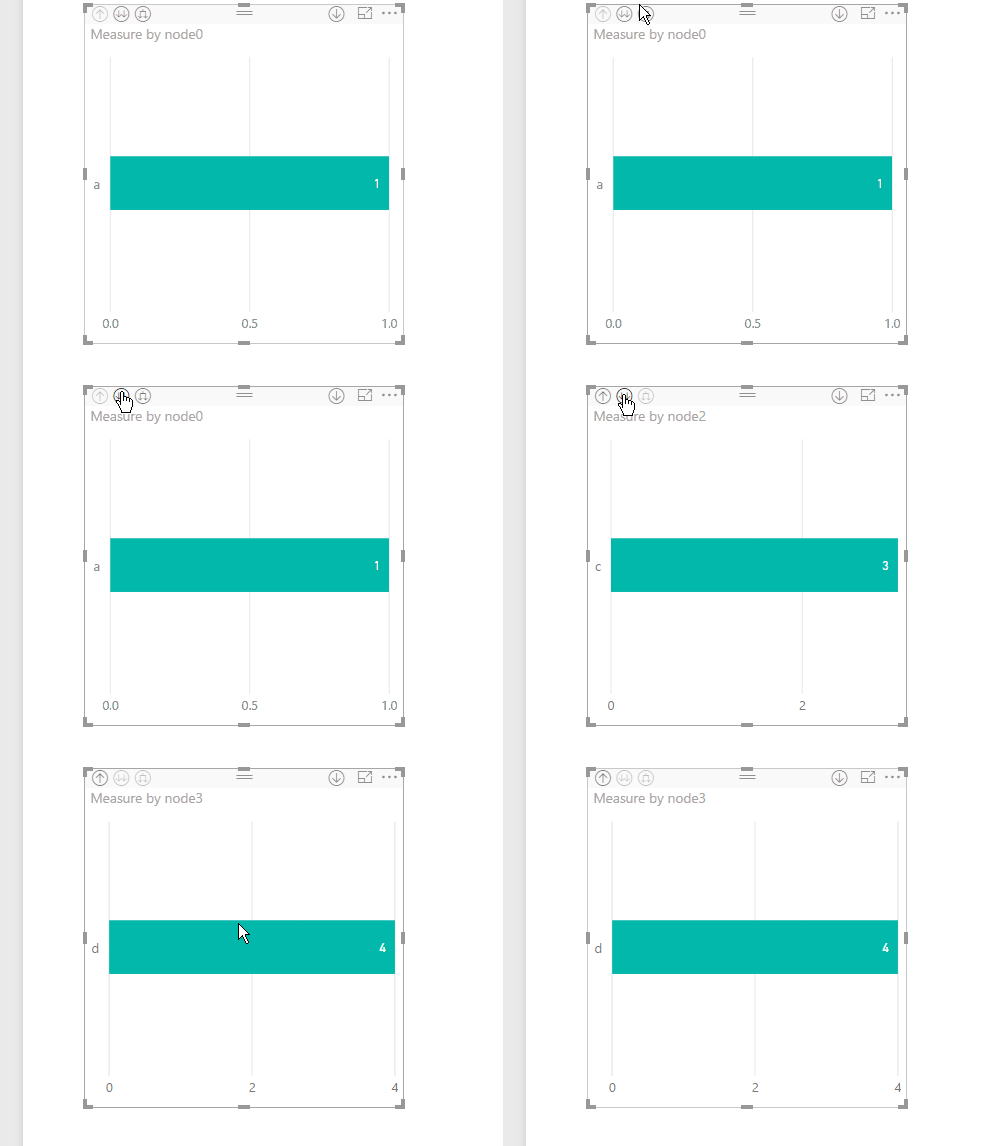
Hmm, that's an interesting problem. I am not aware of a way to build a hierarchy with measures so interested in seeing if someone has an interesting solution to this. You could definitely do it in two different visualizations.
Thanks everyone, we acheived the solution using Switch function and added component type table as selector for selecting one component type or the other.
Check out the May 2026 Power BI update to learn about new features.
Sign up to receive a private message when registration opens and key events begin.
If you have recently started exploring Fabric, we'd love to hear how it's going. Your feedback can help with product improvements.
| User | Count |
|---|---|
| 2 | |
| 1 | |
| 1 | |
| 1 | |
| 1 |