Join us at FabCon Atlanta from March 16 - 20, 2026, for the ultimate Fabric, Power BI, AI and SQL community-led event. Save $200 with code FABCOMM.
Register now!The Power BI Data Visualization World Championships is back! Get ahead of the game and start preparing now! Learn more
Hi everyone.
I try to get sample report in App owns data Sample. I think i did everything with instruction.
1. I have PowerBI Pro user
2. Created workspace with sample report in app.powerbi.com
3. I connected PowerBI Embedded space with this group (diamond next to the name workspace)
4. I registered app on dev.powerbi.com/apps as Native Apps and got clientID - I gave permissions in Azure
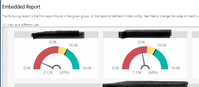
5. When i started project in my local machine report works very nice
localhost
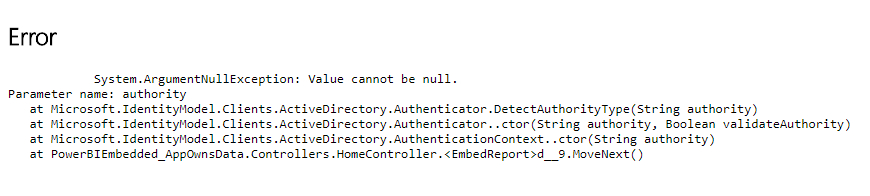
6. Next i publish sample project to App Service in Azure. Home page works ok, but when I go to sample reports (Home/EmbedReport) I get error which I don't have idea what should I do.
Error
Meybe somebody has any idea what should I check ?
Solved! Go to Solution.
Solution:
You need to add key from Cloud.config to Web.config. Easiest Copy-> Past.
Just wanted to add the solution that worked. I added the following in my web.config and republished my app. After that, i restarted my app and it worked. Happy!
Add this code below to web.config (code comes from cloud.config ....\PowerBI-Developer-Samples\PowerBI-Developer-Samples-master\App Owns Data\PowerBIEmbedded_AppOwnsData\CloudConfigs\Power BI Global:)
<appSettings>
<add key="authorityUrl" value="https://login.windows.net/common/oauth2/authorize/" />
<add key="resourceUrl" value="https://analysis.windows.net/powerbi/api" />
<add key="apiUrl" value="https://api.powerbi.com/" />
<add key="embedUrlBase" value="https://app.powerbi.com/" />
</appSettings>
Solution:
You need to add key from Cloud.config to Web.config. Easiest Copy-> Past.
Just wanted to add the solution that worked. I added the following in my web.config and republished my app. After that, i restarted my app and it worked. Happy!
Add this code below to web.config (code comes from cloud.config ....\PowerBI-Developer-Samples\PowerBI-Developer-Samples-master\App Owns Data\PowerBIEmbedded_AppOwnsData\CloudConfigs\Power BI Global:)
<appSettings>
<add key="authorityUrl" value="https://login.windows.net/common/oauth2/authorize/" />
<add key="resourceUrl" value="https://analysis.windows.net/powerbi/api" />
<add key="apiUrl" value="https://api.powerbi.com/" />
<add key="embedUrlBase" value="https://app.powerbi.com/" />
</appSettings>
The Power BI Data Visualization World Championships is back! Get ahead of the game and start preparing now!
Check out the November 2025 Power BI update to learn about new features.