cancel
Showing results for 
Search instead for 
Did you mean: 

Learn from the best! Meet the four finalists headed to the FINALS of the Power BI Dataviz World Championships! Register now

Reply
Anonymous
Not applicable

Adding new Python source refreshes all other Python source tables

Whenever I add a new data source via Python to PowerBi it refreshes all other tables with a Python source. Is there any way to stop this from happening?


here's an example of one code:

import pandas as pd

# Set location source of CSV's
data_location = 'C:/Data Sources/'

# Data source CSV names
base = f'{ data_location }BASE_DATA.csv'
latest = f'{ data_location }LATEST_DATA.csv'
customer_data = f'{ data_location }customer_data.csv'

# Load CSV's in to Dataframes
df_base = pd.read_csv(base , dtype=str, encoding='latin')
df_latest = pd.read_csv(latest , dtype=str, encoding='latin')
df_customer = pd.read_csv(customer_data , dtype=str, encoding='latin')

# Select only required columns and rename so all match
df_base = df_base[['CIDN_','CUSTOMER_NAME_']]
df_latest = df_latest[['cidn','Company Name']]
df_latest = df_latest.rename(columns={"cidn": "CIDN_", "Company Name": "CUSTOMER_NAME_"})
df_customer = df_maxim[['CIDN_','CUSTOMER_NAME_']]

# Merge and remove duplicates
TBL_CUSTOMER_DATA = df_latest.append(df_base)
TBL_CUSTOMER_DATA = TBL_CUSTOMER_DATA.append(df_customer)
TBL_CUSTOMER_DATA.drop_duplicates('CIDN_', inplace=True)

# Final output
TBL_CUSTOMER_DATA = TBL_CUSTOMER_DATA.reset_index(drop=True)

Adding this code as a data source then refreshes every other Python data source.


This is really frustrating as some of the other data sources are very large and take a long time (some can take hours) to refresh, which is exacerbated by the fact I need to connect to a VPN on the other side of the world to access them.

1 ACCEPTED SOLUTION
V-lianl-msft
Community Support
Community Support

Hi @Anonymous ,


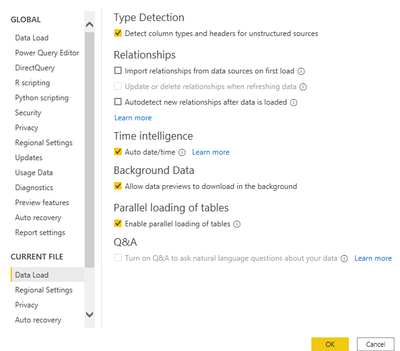
Please uncheck these options so that only new data sources will be loaded when you click apply.

V-lianl-msft_0-1618821552004.png


If you want to refresh a single table, please refer to this blog:

https://www.fourmoo.com/2020/04/22/how-to-refresh-selected-not-all-tables-in-power-bi-desktop/ 


Best Regards,
Liang
If this post helps, then please consider Accept it as the solution to help the other members find it more quickly.

View solution in original post

1 REPLY 1
V-lianl-msft
Community Support
Community Support

Hi @Anonymous ,


Please uncheck these options so that only new data sources will be loaded when you click apply.

V-lianl-msft_0-1618821552004.png


If you want to refresh a single table, please refer to this blog:

https://www.fourmoo.com/2020/04/22/how-to-refresh-selected-not-all-tables-in-power-bi-desktop/ 


Best Regards,
Liang
If this post helps, then please consider Accept it as the solution to help the other members find it more quickly.

Helpful resources

Announcements
Join our Fabric User Panel

Join our Fabric User Panel

Share feedback directly with Fabric product managers, participate in targeted research studies and influence the Fabric roadmap.

March Power BI Update Carousel

Power BI Community Update - March 2026

Check out the March 2026 Power BI update to learn about new features.