Get certified for free when you join Fabric Data Days 2026 and dive into Fabric, Power BI, SQL, AI, and other essential data skills.
Join nowTry your skills in the Power BI Dataviz World Championship! Round one ends June 26. Join now
Hello everybody,
I am reading through the REST API documentation of 'Post import in Group' which in simpler terms (as per my understanding) allows us to upload a PBIX to a workspace.
The name of the report as it appears online and the id of the workspace are specified via parameters in the URL while the binary content is specified in the body of the request.
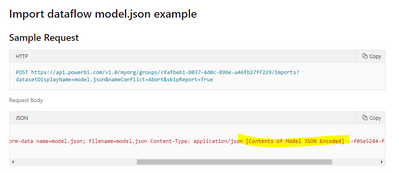
The Microsoft documentation goes a step forward and states that this REST API end point can also be used for importing a model.json file.
Please help me understand.
Does the model.json refer to the underlying DataModel file which can be extracted out of the PBIX by renaming to ZIP?
I was under the impression that the DataModel file - even though viewable by extracting from PBIX is essentially not to be tampered with or relied upon. It should be considered an internal file only.
Thank you,
Sau
Solved! Go to Solution.
Hi @Anonymous ,
Power BI dataflows store data in the CDM folder format in Azure storage.CDM folders use text files to store data, and a model.json file to store metadata.
This API refers to model.json in the dataflow, not model.json in pbix.
Best Regards,
Liang
If this post helps, then please consider Accept it as the solution to help the other members find it more quickly.
Hi @Anonymous ,
Power BI dataflows store data in the CDM folder format in Azure storage.CDM folders use text files to store data, and a model.json file to store metadata.
This API refers to model.json in the dataflow, not model.json in pbix.
Best Regards,
Liang
If this post helps, then please consider Accept it as the solution to help the other members find it more quickly.
| User | Count |
|---|---|
| 2 | |
| 2 | |
| 1 | |
| 1 | |
| 1 |