cancel
Showing results for 
Search instead for 
Did you mean: 

Join the FabCon + SQLCon recap series. Up next: Power BI, Real-Time Intelligence, IQ and AI, and Data Factory take center stage. All sessions are available on-demand after the live show. Register now

Reply
Igorpole
Helper I
Helper I

100% Dynamic Navigation table with Web.Contents()

Hi!


I'm trying to build a custom data connector to the data source through it's API. The problem is that I don't know exactly how many tables are there, what are their names etc. So I need to see all the tables when I connect to the API. With OData.Feed you have it by default, but with Web.Contents I have to use Table.ToNavigationTable function. But to use it I have to create a table with a required structure. What I don't understand is how to create this structure without knowing names of the tables. And if one day new table is added, how to get it automatically? Any ideas, links?

1 ACCEPTED SOLUTION
artemus
Microsoft Employee
Microsoft Employee

If you don't have a list of tables, simply add a text field in the connector for the user to manually type it in. Then just skip the navigation table and return the requested table.

View solution in original post

4 REPLIES 4
artemus
Microsoft Employee
Microsoft Employee

If you don't have a list of tables, simply add a text field in the connector for the user to manually type it in. Then just skip the navigation table and return the requested table.

Thank you! So, in general, there is no way to get all the tables without knowing them in advance.

v-lionel-msft
Community Support
Community Support

Hi @Igorpole ,


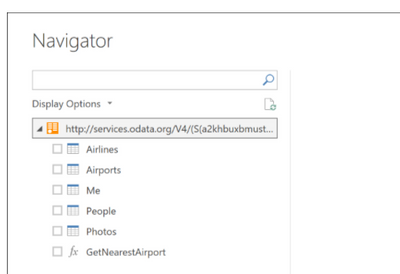
In other words, when you use the Web.Contents connect to the  API, there is no navigation bar as follows?

v-lionel-msft_0-1617600485444.png

This is because the API returns data in JSON format, so there is no navigation bar.


Best regards,
Lionel Chen

If this post helps, then please consider Accept it as the solution to help the other members find it more quickly.


Hi! To be precise there is no navigation table in the case of Web.Contents as there is no metadata returned as in the case of OData. Feed. 

Helpful resources

Announcements
April Power BI Update Carousel

Power BI Monthly Update - April 2026

Check out the April 2026 Power BI update to learn about new features.

New to Fabric survey Carousel

New to Fabric Survey

If you have recently started exploring Fabric, we'd love to hear how it's going. Your feedback can help with product improvements.

Power BI DataViz World Championships carousel

Power BI DataViz World Championships - June 2026

A new Power BI DataViz World Championship is coming this June! Don't miss out on submitting your entry.

FabCon and SQLCon Highlights Carousel

FabCon &SQLCon Highlights

Experience the highlights from FabCon & SQLCon, available live and on-demand starting April 14th.