cancel
Showing results for 
Search instead for 
Did you mean: 

The Power BI Data Visualization World Championships is back! Get ahead of the game and start preparing now! Learn more

Reply
Husain
Advocate I
Advocate I

SampleMatrix Custom Visual doen't work

I am trying to run the the SampleMatrix Custom Visual frm Microsoft to learn about the Subtotals API availiable starting with the API 2.6.


However it doesn't work


https://github.com/microsoft/Powerbi-Visuals-SampleMatrix


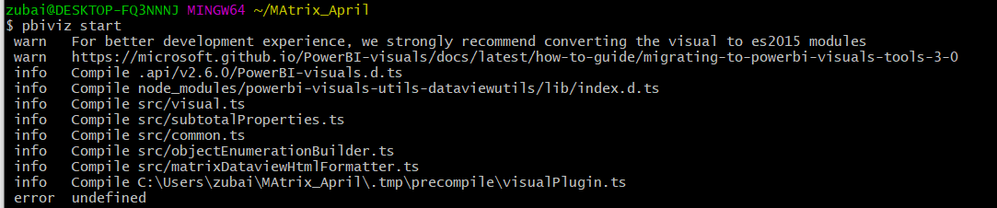
When I run pbiviz start I get following

matrix error.png


@dm-p  
@jppp 


Could you help please?


1 ACCEPTED SOLUTION

Hi @Husain - yes, the SDK is a global install so any other projects may be impacted.

In these cases you'd need to reinstall the SDK you want to work with. It's a pain and a large reason why I can't assist on this issue more directly (as I have a huge v3 project that I'm working on at present that I can't deviate from).

This is a problem working with any visual prior to v3 of the SDK, as the API and SDK were bundled together.

For visuals developed on v3 or later the API and SDK are decoupled so it's easier to work across projects on different versions of the API, as you only need to install the necessary version of powerbi-visuals-api local to the project.

If you want to use the same SDK globally for all your projects and work with the sample, you would need to migrate the sample matrix project to support v3 SDK, (or ask MS to do it).

Regarding your follow-on error from the downgrade, if you've re-run npm i from the root of your project to ensure that all packages are correct following the downgrade, then this might need to be rasied as an issue on the repo, or you can try contacting pbicvsupport@microsoft.com to see if the team can assist.

Regards,

Daniel


Did I answer your question? Mark my post as a solution!

Proud to be a Super User!


On how to ask a technical question, if you really want an answer (courtesy of SQLBI)


View solution in original post

4 REPLIES 4
dm-p
Super User
Super User

Hi @Husain,

Did you follow the instructions in the repo about installing the correct version of powerbi-visuals-tools? From the error message in your screenshot, I would assume that you're attempting this on 3.1 or higher?

If so, you will need to install version 2.5 as per the linked instructions:

npm install -g powerbi-visuals-tools@2.5.0

Note that you will need to re-generate your certificate as this is matched to the version of the tools that you have installed. In versions prior to 3.1, this process is a 2-step process:

pbiviz --create-cert
pbiviz --install-cert

Good luck!

Daniel


Did I answer your question? Mark my post as a solution!

Proud to be a Super User!


On how to ask a technical question, if you really want an answer (courtesy of SQLBI)


Hi @dm-p 


I tried these steps. I get following error now


errorPBI.png

HI @dm-p 


When I downgrade and install cert

npm install -g powerbi-visuals-tools@2.5.0


My other custom visuals stop working and I get this message

$ pbiviz start
 info   Building visual...
 error  VALIDATION   Invalid API Version v3.5.0


Hi @Husain - yes, the SDK is a global install so any other projects may be impacted.

In these cases you'd need to reinstall the SDK you want to work with. It's a pain and a large reason why I can't assist on this issue more directly (as I have a huge v3 project that I'm working on at present that I can't deviate from).

This is a problem working with any visual prior to v3 of the SDK, as the API and SDK were bundled together.

For visuals developed on v3 or later the API and SDK are decoupled so it's easier to work across projects on different versions of the API, as you only need to install the necessary version of powerbi-visuals-api local to the project.

If you want to use the same SDK globally for all your projects and work with the sample, you would need to migrate the sample matrix project to support v3 SDK, (or ask MS to do it).

Regarding your follow-on error from the downgrade, if you've re-run npm i from the root of your project to ensure that all packages are correct following the downgrade, then this might need to be rasied as an issue on the repo, or you can try contacting pbicvsupport@microsoft.com to see if the team can assist.

Regards,

Daniel


Did I answer your question? Mark my post as a solution!

Proud to be a Super User!


On how to ask a technical question, if you really want an answer (courtesy of SQLBI)


Helpful resources

Announcements
Power BI DataViz World Championships

Power BI Dataviz World Championships

The Power BI Data Visualization World Championships is back! Get ahead of the game and start preparing now!

December 2025 Power BI Update Carousel

Power BI Monthly Update - December 2025

Check out the December 2025 Power BI Holiday Recap!

FabCon Atlanta 2026 carousel

FabCon Atlanta 2026

Join us at FabCon Atlanta, March 16-20, for the ultimate Fabric, Power BI, AI and SQL community-led event. Save $200 with code FABCOMM.