cancel
Showing results for 
Search instead for 
Did you mean: 

The Power BI Data Visualization World Championships is back! Get ahead of the game and start preparing now! Learn more

Reply
Anonymous
Not applicable

weird Ribbon Chart: not displaying full?

Hi there,


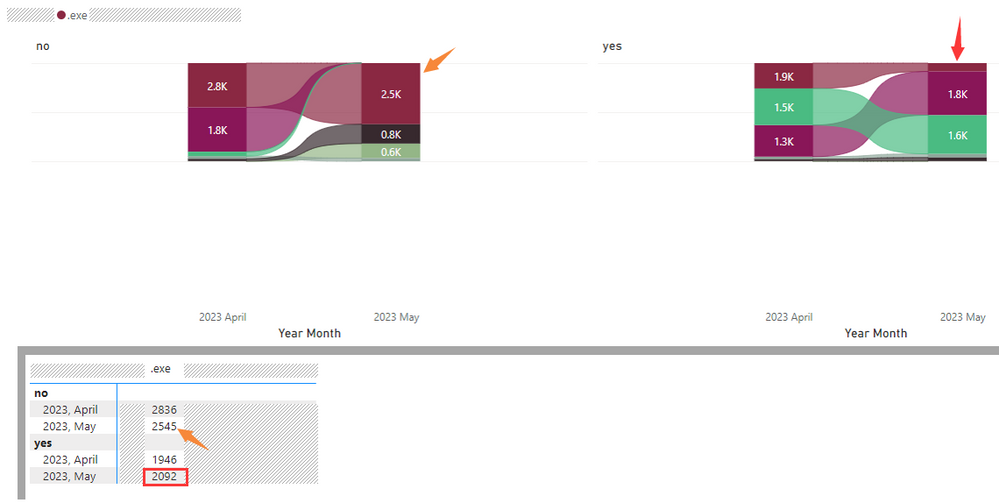
Got a question about Ribbon Chart as following shows, seems the display is incomplete (height issue).

As can be seen, a "small multiples" is applied, in the field, only 2 values: yes, no

After applying the small multiples, the Ribbon Chart changed with weird visuals:

as orange arrows point: the 2.5K area in May 2023 is apparently higher than 2.8K in April 2023.

as red box and arrow point: the 2092 in May 2023 is displaying much smaller area compare to 1.9K.


Seeing from the height of the 2 charts (left & right), seems the Y-axis is set to certain value so that the ribbon charts cannot be fully displayed, but I got nowhere to see the setting.


Is there any advice please?

h_l_0-1686558691046.png


Thanks.

H

1 ACCEPTED SOLUTION
v-jingzhang
Community Support
Community Support

Hi @Anonymous 


Based on my test, I'm not able to reproduce this issue. I'm using Power BI Desktop 2.116.966.0 64-bit (April 2023). Which version of Power BI Desktop are you using? Is it possible to share a sample pbix which can reproduce this issue? How to provide sample data in the Power BI Forum

vjingzhang_0-1686708511364.png


As the Ribbon Chart does not have a Y-axis formatting option, you can try converting it to a column chart, check whether the Y-axis range is appropriate, then change back to a Ribbon Chart.


Best Regards,
Community Support Team _ Jing
If this post helps, please Accept it as Solution to help other members find it.

View solution in original post

2 REPLIES 2
v-jingzhang
Community Support
Community Support

Hi @Anonymous 


Based on my test, I'm not able to reproduce this issue. I'm using Power BI Desktop 2.116.966.0 64-bit (April 2023). Which version of Power BI Desktop are you using? Is it possible to share a sample pbix which can reproduce this issue? How to provide sample data in the Power BI Forum

vjingzhang_0-1686708511364.png


As the Ribbon Chart does not have a Y-axis formatting option, you can try converting it to a column chart, check whether the Y-axis range is appropriate, then change back to a Ribbon Chart.


Best Regards,
Community Support Team _ Jing
If this post helps, please Accept it as Solution to help other members find it.

Anonymous
Not applicable

Hi Jing,


The problem fixed after upgrading to June 2023 version.

Thanks.


H

Helpful resources

Announcements
Power BI DataViz World Championships

Power BI Dataviz World Championships

The Power BI Data Visualization World Championships is back! Get ahead of the game and start preparing now!

December 2025 Power BI Update Carousel

Power BI Monthly Update - December 2025

Check out the December 2025 Power BI Holiday Recap!

FabCon Atlanta 2026 carousel

FabCon Atlanta 2026

Join us at FabCon Atlanta, March 16-20, for the ultimate Fabric, Power BI, AI and SQL community-led event. Save $200 with code FABCOMM.