cancel
Showing results for 
Search instead for 
Did you mean: 

The Power BI Data Visualization World Championships is back! Get ahead of the game and start preparing now! Learn more

Reply
Anonymous
Not applicable

visual dates

I have a very simple table with a simple Visual, but there are a several things that arent appearing as i would like.

The data isnt lining up with the dates on X axis.  In the picture 366 tonns should have 08 APRIL below it but has 07 Apr to the left of it. 

I would also like the first date to also appear on the graph, which would be 01 Apr


Thanks in advance

CaptureDD.PNG

1 ACCEPTED SOLUTION
Gordonlilj
Solution Sage
Solution Sage

Hi,


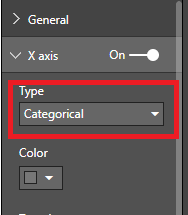
You could try and switch from continuous to categorical under the x axis in the format panel

Capture.PNG

View solution in original post

3 REPLIES 3
Gordonlilj
Solution Sage
Solution Sage

Hi,


You could try and switch from continuous to categorical under the x axis in the format panel

Capture.PNG

Anonymous
Not applicable

That seems to have the data displaying better now.

Strange that continious would have that effect though.


Thanks for the help.

In you case continious is showing the data correctly but it can be a bit misleading at times in the way continious is visualized in Power Bi

Helpful resources

Announcements
Power BI DataViz World Championships

Power BI Dataviz World Championships

The Power BI Data Visualization World Championships is back! Get ahead of the game and start preparing now!

December 2025 Power BI Update Carousel

Power BI Monthly Update - December 2025

Check out the December 2025 Power BI Holiday Recap!

FabCon Atlanta 2026 carousel

FabCon Atlanta 2026

Join us at FabCon Atlanta, March 16-20, for the ultimate Fabric, Power BI, AI and SQL community-led event. Save $200 with code FABCOMM.