Don't miss your chance to take the Fabric Data Engineer (DP-600) exam for FREE! Find out how by watching the DP-600 session on-demand now through April 28th.
Learn moreJoin the FabCon + SQLCon recap series. Up next: Power BI, Real-Time Intelligence, IQ and AI, and Data Factory take center stage. All sessions are available on-demand after the live show. Register now
Hi
I am trying to define measure that gives "cost per kilometer"
I have a fact table having [Equipment], [Loaded Distance] and [Deadhead Distance] column
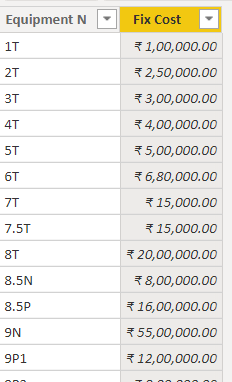
a dimention table called fixed Cost having [Equipment N] and [Fix Cost] columns
I have a measure
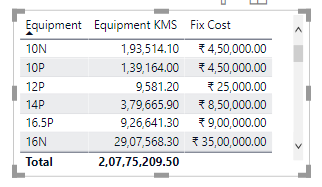
Equipment KMS = CALCULATE(SUM('Prototype Modeling_Freight'[Loaded Distance]) + SUM('Prototype Modeling_Freight'[Deadhead Distance]))
Shown as a table visualization
Through a relationship connection between Equipment and Equipment N
MY REQUIREMENT :
A measure defined for each equipment as [Fix cost] / [Equiment KMS]
TIA
Hi @Anonymous ,
Has your problem been solved?
Best regards,
Lionel Chen
If this post helps, then please consider Accept it as the solution to help the other members find it more quickly.
Hi @Anonymous ,
Like this?
Measure =
DIVIDE(
SELECTEDVALUE('Fix cost'[Fix cost]),
[Equipment KMS],
BLANK()
)
Can you show the results you want in a table like mine? And indicate whether it is a measure or a calculated column.
Best regards,
Lionel Chen
If this post helps, then please consider Accept it as the solution to help the other members find it more quickly.
So can you put Equipment N from Fixed Costs in a visual with a measure like:
Measure = SUM('Fixed Costs'[Fix Cost]) / [Equipment KMS]
?
Hey @Greg_Deckler Thanks for replying.
No, I don't want to sum it
I want to use unique related values from a dimension table and use them in the expression ?
for eg:
the column [equipment] in my fact table is related to [equipment N] in dimension table.
Now what I want is to pull this fix cost from dimension table and use it in an expression, so that it goes to dimension table and give me the related value for every row iteration.
I am able to use it in a direct table visualization, but can't use it in a mathematical expression
I think what I am looking for is a "lookupvalue" or equivalent. But I am struggling to use it
Right going from the fact table back to your dimension would either require your relationship arrows to flow in reverse or in both directions or you would need LOOKUPVALUE or MAXX(FILTER(...),...).
Hard to be specific with LOOKUPVALUE and such, this may help you: https://community.powerbi.com/t5/Quick-Measures-Gallery/Lookup-Min-Max/m-p/985814#M434
It at least demonstrates the use of LOOKUPVALUE.
Otherwise, Please see this post regarding How to Get Your Question Answered Quickly: https://community.powerbi.com/t5/Community-Blog/How-to-Get-Your-Question-Answered-Quickly/ba-p/38490
The most important parts are:
1. Sample data as text, use the table tool in the editing bar
2. Expected output from sample data
3. Explanation in words of how to get from 1. to 2.
Check out the April 2026 Power BI update to learn about new features.
If you have recently started exploring Fabric, we'd love to hear how it's going. Your feedback can help with product improvements.
A new Power BI DataViz World Championship is coming this June! Don't miss out on submitting your entry.
| User | Count |
|---|---|
| 45 | |
| 38 | |
| 34 | |
| 21 | |
| 17 |
| User | Count |
|---|---|
| 66 | |
| 64 | |
| 31 | |
| 26 | |
| 26 |