cancel
Showing results for 
Search instead for 
Did you mean: 

July 28 - August 9 | Final Round of the Power BI Dataviz World Championships. This is your chance. Learn more

Reply
jlynch
Frequent Visitor

transpose list

I have 3 goals...each goal has versions.  I have easily listed each goal in a Table that shows each version.  What i would like is to have a different grouping:

Current State:

Goal 1       Version               Goal 2            Version                       Goal 3           Version

g1v1          1                          g2v1             1                                 g3v1              1

g1v2           2                         g2v2             2                                 g3v2              2

g1v3          3                          g3v3             3                                 g3v3              3


Where each goal is a separate table

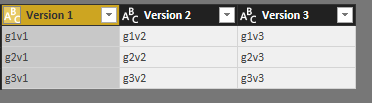
What i want is:


Version 1                               Version 2                               Version 3

G1v1                                      g1v2                                  G1v3

g2v1                                       g2v2                                  g2v3

g3v1                                      g3v2                                   g3v3


I also need this to be in a chart so i can use conditional formatting.

Any help is appreciated.

1 ACCEPTED SOLUTION

Hi @jlynch

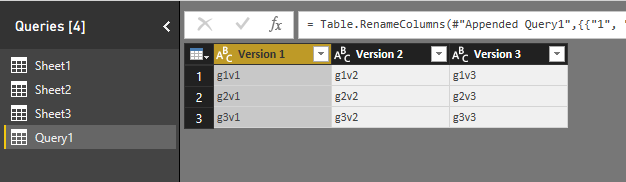
Please refer to the modified file

4.png

5.png

let
    Source1 = Table.SelectColumns(Sheet4,{"Goal 1","Version1"}),
    #"Pivoted Column1" = Table.Pivot(Table.TransformColumnTypes(Source1, {{"Version1", type text}}, "en-US"), List.Distinct(Table.TransformColumnTypes(Source1, {{"Version1", type text}}, "en-US")[Version1]), "Version1", "Goal 1"),
    Source2 = Table.SelectColumns(Sheet4,{"Goal 2","Version2"}),
    #"Pivoted Column2" = Table.Pivot(Table.TransformColumnTypes(Source2, {{"Version2", type text}}, "en-US"), List.Distinct(Table.TransformColumnTypes(Source2, {{"Version2", type text}}, "en-US")[Version2]), "Version2", "Goal 2"),
    Source3 = Table.SelectColumns(Sheet4,{"Goal 3","Version3"}),
    #"Pivoted Column3" = Table.Pivot(Table.TransformColumnTypes(Source3, {{"Version3", type text}}, "en-US"), List.Distinct(Table.TransformColumnTypes(Source3, {{"Version3", type text}}, "en-US")[Version3]), "Version3", "Goal 3"),
    #"Appended Query1"= Table.Combine({#"Pivoted Column1", #"Pivoted Column2", #"Pivoted Column3" }),
    #"Renamed Columns" = Table.RenameColumns(#"Appended Query1",{{"1", "Version 1"}, {"2", "Version 2"}, {"3", "Version 3"}})
in
    #"Renamed Columns"


Best Regards

Maggie

View solution in original post

4 REPLIES 4
v-juanli-msft
Community Support
Community Support

Hi @jlynch

In Query Editor

Create a blank query, code in Advanced editor

let
    Source1 = Sheet1,
    #"Pivoted Column1" = Table.Pivot(Table.TransformColumnTypes(Source1, {{"Version", type text}}, "en-US"), List.Distinct(Table.TransformColumnTypes(Source1, {{"Version", type text}}, "en-US")[Version]), "Version", "Goal 1"),
    Source2 = Sheet2,
    #"Pivoted Column2" = Table.Pivot(Table.TransformColumnTypes(Source2, {{"Version", type text}}, "en-US"), List.Distinct(Table.TransformColumnTypes(Source2, {{"Version", type text}}, "en-US")[Version]), "Version", "Goal 2"),
    Source3 = Sheet3,
    #"Pivoted Column3" = Table.Pivot(Table.TransformColumnTypes(Source3, {{"Version", type text}}, "en-US"), List.Distinct(Table.TransformColumnTypes(Source3, {{"Version", type text}}, "en-US")[Version]), "Version", "Goal 3"),
    #"Appended Query1"= Table.Combine({#"Pivoted Column1", #"Pivoted Column2", #"Pivoted Column3" }),
    #"Renamed Columns" = Table.RenameColumns(#"Appended Query1",{{"1", "Version 1"}, {"2", "Version 2"}, {"3", "Version 3"}})
in
    #"Renamed Columns"

9.png


Best Regards

Maggie

this is awesome but one point I'd like to clarify, goal 1,2 and 3 are all in the same table as well as the version.  so would I use that table as sheet1,2 and 3 and keep the different sources?


The way i built the data, there is a new version when any one of the goals change so there is 1 version per set of goals, and it's all in one table.


Just making sure I understand the syntax here. 

Hi @jlynch

Please refer to the modified file

4.png

5.png

let
    Source1 = Table.SelectColumns(Sheet4,{"Goal 1","Version1"}),
    #"Pivoted Column1" = Table.Pivot(Table.TransformColumnTypes(Source1, {{"Version1", type text}}, "en-US"), List.Distinct(Table.TransformColumnTypes(Source1, {{"Version1", type text}}, "en-US")[Version1]), "Version1", "Goal 1"),
    Source2 = Table.SelectColumns(Sheet4,{"Goal 2","Version2"}),
    #"Pivoted Column2" = Table.Pivot(Table.TransformColumnTypes(Source2, {{"Version2", type text}}, "en-US"), List.Distinct(Table.TransformColumnTypes(Source2, {{"Version2", type text}}, "en-US")[Version2]), "Version2", "Goal 2"),
    Source3 = Table.SelectColumns(Sheet4,{"Goal 3","Version3"}),
    #"Pivoted Column3" = Table.Pivot(Table.TransformColumnTypes(Source3, {{"Version3", type text}}, "en-US"), List.Distinct(Table.TransformColumnTypes(Source3, {{"Version3", type text}}, "en-US")[Version3]), "Version3", "Goal 3"),
    #"Appended Query1"= Table.Combine({#"Pivoted Column1", #"Pivoted Column2", #"Pivoted Column3" }),
    #"Renamed Columns" = Table.RenameColumns(#"Appended Query1",{{"1", "Version 1"}, {"2", "Version 2"}, {"3", "Version 3"}})
in
    #"Renamed Columns"


Best Regards

Maggie

does it matter if in table4 - Version1, version2 and Version3 are actually the same column?  I assume I can just use that one variable in place of the 3 and therefor thank you for your solution.

Helpful resources

Announcements
FabCon and SQLCon Barcelona 2026

FabCon & SQLCon – Barcelona 2026

Join us in Barcelona for FabCon and SQLCon, the Fabric, Power BI, SQL, and AI community event. Save €200 with code FABCMTY200.

Fabric Community Sticker Design Challenge Barcelona Carousel

Fabric Community Sticker Challenge - Barcelona 2026

If you love stickers, then you will definitely want to check out our community sticker challenge, Barcelona edition!

July Power BI Update Carousel

Power BI Monthly Update - July 2026

Check out the July 2026 Power BI update to learn about new features.

Power BI DataViz World Championships carousel

Power BI DataViz World Championships - June 2026

A new Power BI DataViz World Championship is coming this June! Don't miss out on submitting your entry.