Join us at FabCon Atlanta from March 16 - 20, 2026, for the ultimate Fabric, Power BI, AI and SQL community-led event. Save $200 with code FABCOMM.
Register now!The Power BI Data Visualization World Championships is back! It's time to submit your entry. Live now!
I have 3 goals...each goal has versions. I have easily listed each goal in a Table that shows each version. What i would like is to have a different grouping:
Current State:
Goal 1 Version Goal 2 Version Goal 3 Version
g1v1 1 g2v1 1 g3v1 1
g1v2 2 g2v2 2 g3v2 2
g1v3 3 g3v3 3 g3v3 3
Where each goal is a separate table
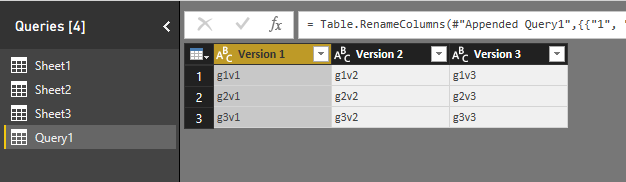
What i want is:
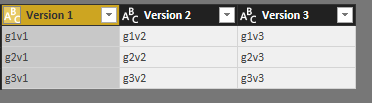
Version 1 Version 2 Version 3
G1v1 g1v2 G1v3
g2v1 g2v2 g2v3
g3v1 g3v2 g3v3
I also need this to be in a chart so i can use conditional formatting.
Any help is appreciated.
Solved! Go to Solution.
Hi @jlynch
Please refer to the modified file
let
Source1 = Table.SelectColumns(Sheet4,{"Goal 1","Version1"}),
#"Pivoted Column1" = Table.Pivot(Table.TransformColumnTypes(Source1, {{"Version1", type text}}, "en-US"), List.Distinct(Table.TransformColumnTypes(Source1, {{"Version1", type text}}, "en-US")[Version1]), "Version1", "Goal 1"),
Source2 = Table.SelectColumns(Sheet4,{"Goal 2","Version2"}),
#"Pivoted Column2" = Table.Pivot(Table.TransformColumnTypes(Source2, {{"Version2", type text}}, "en-US"), List.Distinct(Table.TransformColumnTypes(Source2, {{"Version2", type text}}, "en-US")[Version2]), "Version2", "Goal 2"),
Source3 = Table.SelectColumns(Sheet4,{"Goal 3","Version3"}),
#"Pivoted Column3" = Table.Pivot(Table.TransformColumnTypes(Source3, {{"Version3", type text}}, "en-US"), List.Distinct(Table.TransformColumnTypes(Source3, {{"Version3", type text}}, "en-US")[Version3]), "Version3", "Goal 3"),
#"Appended Query1"= Table.Combine({#"Pivoted Column1", #"Pivoted Column2", #"Pivoted Column3" }),
#"Renamed Columns" = Table.RenameColumns(#"Appended Query1",{{"1", "Version 1"}, {"2", "Version 2"}, {"3", "Version 3"}})
in
#"Renamed Columns"
Best Regards
Maggie
Hi @jlynch
In Query Editor
Create a blank query, code in Advanced editor
let
Source1 = Sheet1,
#"Pivoted Column1" = Table.Pivot(Table.TransformColumnTypes(Source1, {{"Version", type text}}, "en-US"), List.Distinct(Table.TransformColumnTypes(Source1, {{"Version", type text}}, "en-US")[Version]), "Version", "Goal 1"),
Source2 = Sheet2,
#"Pivoted Column2" = Table.Pivot(Table.TransformColumnTypes(Source2, {{"Version", type text}}, "en-US"), List.Distinct(Table.TransformColumnTypes(Source2, {{"Version", type text}}, "en-US")[Version]), "Version", "Goal 2"),
Source3 = Sheet3,
#"Pivoted Column3" = Table.Pivot(Table.TransformColumnTypes(Source3, {{"Version", type text}}, "en-US"), List.Distinct(Table.TransformColumnTypes(Source3, {{"Version", type text}}, "en-US")[Version]), "Version", "Goal 3"),
#"Appended Query1"= Table.Combine({#"Pivoted Column1", #"Pivoted Column2", #"Pivoted Column3" }),
#"Renamed Columns" = Table.RenameColumns(#"Appended Query1",{{"1", "Version 1"}, {"2", "Version 2"}, {"3", "Version 3"}})
in
#"Renamed Columns"
Best Regards
Maggie
this is awesome but one point I'd like to clarify, goal 1,2 and 3 are all in the same table as well as the version. so would I use that table as sheet1,2 and 3 and keep the different sources?
The way i built the data, there is a new version when any one of the goals change so there is 1 version per set of goals, and it's all in one table.
Just making sure I understand the syntax here.
Hi @jlynch
Please refer to the modified file
let
Source1 = Table.SelectColumns(Sheet4,{"Goal 1","Version1"}),
#"Pivoted Column1" = Table.Pivot(Table.TransformColumnTypes(Source1, {{"Version1", type text}}, "en-US"), List.Distinct(Table.TransformColumnTypes(Source1, {{"Version1", type text}}, "en-US")[Version1]), "Version1", "Goal 1"),
Source2 = Table.SelectColumns(Sheet4,{"Goal 2","Version2"}),
#"Pivoted Column2" = Table.Pivot(Table.TransformColumnTypes(Source2, {{"Version2", type text}}, "en-US"), List.Distinct(Table.TransformColumnTypes(Source2, {{"Version2", type text}}, "en-US")[Version2]), "Version2", "Goal 2"),
Source3 = Table.SelectColumns(Sheet4,{"Goal 3","Version3"}),
#"Pivoted Column3" = Table.Pivot(Table.TransformColumnTypes(Source3, {{"Version3", type text}}, "en-US"), List.Distinct(Table.TransformColumnTypes(Source3, {{"Version3", type text}}, "en-US")[Version3]), "Version3", "Goal 3"),
#"Appended Query1"= Table.Combine({#"Pivoted Column1", #"Pivoted Column2", #"Pivoted Column3" }),
#"Renamed Columns" = Table.RenameColumns(#"Appended Query1",{{"1", "Version 1"}, {"2", "Version 2"}, {"3", "Version 3"}})
in
#"Renamed Columns"
Best Regards
Maggie
does it matter if in table4 - Version1, version2 and Version3 are actually the same column? I assume I can just use that one variable in place of the 3 and therefor thank you for your solution.
The Power BI Data Visualization World Championships is back! It's time to submit your entry.
Check out the January 2026 Power BI update to learn about new features.
| User | Count |
|---|---|
| 61 | |
| 49 | |
| 30 | |
| 25 | |
| 23 |
| User | Count |
|---|---|
| 128 | |
| 104 | |
| 56 | |
| 39 | |
| 31 |