Join the FabCon + SQLCon recap series. Up next: Power BI, Real-Time Intelligence, IQ and AI, and Data Factory take center stage. All sessions are available on-demand after the live show. Register now
@Anonymous it looks like there's no problem with the formula itself. It must be somewhere else, probably something to do with that Due Date column. Hit OK and select one of those error cells. What does it say down at the bottom of the screen when you do that?
Good, work, try too: (M language | Power Query)
Duration.Days(Date.From(DateTime.LocalNow())-Date.From([MinDueDate]))
@Anonymous DateTime.LocalNow()
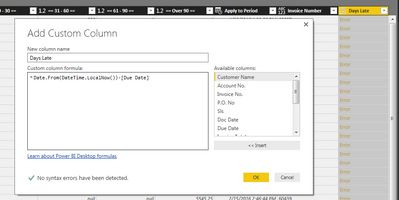
That returns a datetime value, not a simple date, so if you're using it in another formula to compare with other dates, you may need to nest it to strip out the time. Like so:
Date.From(DateTime.LocalNow())
Trying my hardest to learn DAX and now they throw M Language on top of it?????
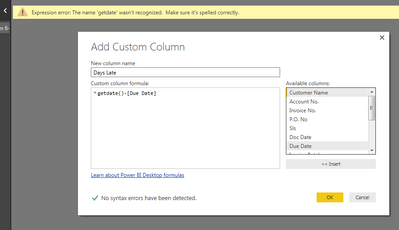
Anyway, Thank you for your help on this project I'm working on. Here is my error, do you have any suggestions?
@Anonymous it looks like there's no problem with the formula itself. It must be somewhere else, probably something to do with that Due Date column. Hit OK and select one of those error cells. What does it say down at the bottom of the screen when you do that?
The error was that my Due Date had time in it also so I changed it to:
Date.From(DateTime.LocalNow())-Date.From([Due Date])
and it worked.
Thank You!!
@Anonymous if you want to keep the time you could just skip both of the Date.From statements entirely. Or I think you could combine them.
Date.From(DateTime.LocalNow() - [Due Date])
...should work exactly the same, and might even run a little faster.
Check out the April 2026 Power BI update to learn about new features.
If you have recently started exploring Fabric, we'd love to hear how it's going. Your feedback can help with product improvements.
A new Power BI DataViz World Championship is coming this June! Don't miss out on submitting your entry.
| User | Count |
|---|---|
| 42 | |
| 37 | |
| 35 | |
| 22 | |
| 15 |
| User | Count |
|---|---|
| 67 | |
| 58 | |
| 29 | |
| 27 | |
| 25 |