cancel
Showing results for 
Search instead for 
Did you mean: 

Vote for your favorite vizzies from the Power BI Dataviz World Championship submissions. Vote now!

Reply
Anonymous
Not applicable

today function in M language

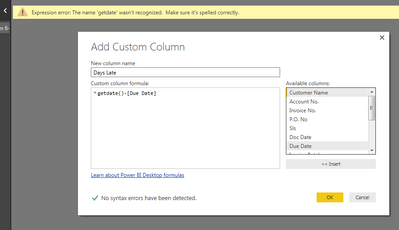
getdate() , today() ?

Capture.PNG

1 ACCEPTED SOLUTION
Anonymous
Not applicable

@Anonymous it looks like there's no problem with the formula itself. It must be somewhere else, probably something to do with that Due Date column. Hit OK and select one of those error cells. What does it say down at the bottom of the screen when you do that?

View solution in original post

6 REPLIES 6
JulioGadioli
Frequent Visitor

Good, work, try too: (M language | Power Query)

Duration.Days(Date.From(DateTime.LocalNow())-Date.From([MinDueDate]))

Anonymous
Not applicable

@Anonymous DateTime.LocalNow()


That returns a datetime value, not a simple date, so if you're using it in another formula to compare with other dates, you may need to nest it to strip out the time. Like so:


Date.From(DateTime.LocalNow())

Anonymous
Not applicable

Trying my hardest to learn DAX and now they throw M Language on top of it?????


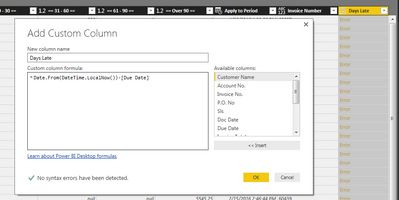
Anyway, Thank you for your help on this project I'm working on.  Here is my error, do you have any suggestions?


Capture.PNG

Anonymous
Not applicable

@Anonymous it looks like there's no problem with the formula itself. It must be somewhere else, probably something to do with that Due Date column. Hit OK and select one of those error cells. What does it say down at the bottom of the screen when you do that?

Anonymous
Not applicable

The error was that my Due Date had time in it also so I changed it to:


Date.From(DateTime.LocalNow())-Date.From([Due Date])


and it worked.


Thank You!!

Anonymous
Not applicable

@Anonymous if you want to keep the time you could just skip both of the Date.From statements entirely. Or I think you could combine them.


Date.From(DateTime.LocalNow() - [Due Date])


...should work exactly the same, and might even run a little faster.

Helpful resources

Announcements
Power BI DataViz World Championships

Power BI Dataviz World Championships

Vote for your favorite vizzies from the Power BI World Championship submissions!

Sticker Challenge 2026 Carousel

Join our Community Sticker Challenge 2026

If you love stickers, then you will definitely want to check out our Community Sticker Challenge!

January Power BI Update Carousel

Power BI Monthly Update - January 2026

Check out the January 2026 Power BI update to learn about new features.

FabCon Atlanta 2026 carousel

FabCon Atlanta 2026

Join us at FabCon Atlanta, March 16-20, for the ultimate Fabric, Power BI, AI and SQL community-led event. Save $200 with code FABCOMM.