cancel
Showing results for 
Search instead for 
Did you mean: 

July 28 - August 9 | Final Round of the Power BI Dataviz World Championships. This is your chance. Learn more

Reply
bideveloper555
Helper IV
Helper IV

sub groups by condition (Azure Devops) Forecasting

hi

Most have seen Azure Devops data set.(for allocating sprints).


i have scenario: i should able to forecast week for each item based on stackorder ascending.

below is sample data.

IDStatePointsstackOrder
1001New105
1002Hold43
1003New51
1004Hold44
1005Active1020
1006Closed2030
1007New152
1008Hold57
1009Hold108
1010New36
1011NEw59

Output require:

"Forecast" for week logic is based on sum of points <= 20 order by stackorder asc.

if it more than 20 points tickets(ID) falls into next week. how do i get forecast column? Group < 20 is just calculation for more understanding.

IDStatePointsGroup < 20 stackOrderForecast
1003New5201Week 1
1007New15202Week 1
1002Hold4183Week 1
1004Hold4184Week 2
1001New10185Week 2
1010New3186Week 3
1008Hold5187Week 3
1009Hold10188Week 3
1011NEw559Week 4
1005Active10 20 
1006Closed20 30 


@amitchandak 

Thanks


1 ACCEPTED SOLUTION
V-lianl-msft
Community Support
Community Support

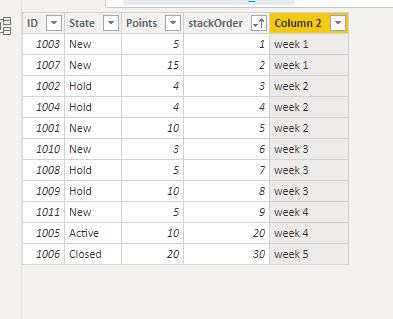
Try to create a new column like below:

Column 2 = var total_ =
SUMX(FILTER('Table','Table'[stackOrder]<=EARLIER('Table'[stackOrder])),'Table'[Points])
var week_number = ROUNDUP(DIVIDE(total_,20),-0.1)
return "week "&week_number

Vlianlmsft_0-1635143852024.png


View solution in original post

3 REPLIES 3
V-lianl-msft
Community Support
Community Support

Try to create a new column like below:

Column 2 = var total_ =
SUMX(FILTER('Table','Table'[stackOrder]<=EARLIER('Table'[stackOrder])),'Table'[Points])
var week_number = ROUNDUP(DIVIDE(total_,20),-0.1)
return "week "&week_number

Vlianlmsft_0-1635143852024.png


Thank you this is working perfectly.

but bit of help with dyanmic week number.

currently we are in week 20(current week) lets says. week 20 defined by start date and end date

 
TODAY () >= Table[StartDate]
&& TODAY () <= Table[EndDate]
 

so i need to add above column which you created 20+1 as week 21.

This will chnage next week as week 21, than 21+1 as week 22.

bideveloper555
Helper IV
Helper IV

@parry2k any help?

Helpful resources

Announcements
FabCon and SQLCon Barcelona 2026

FabCon & SQLCon – Barcelona 2026

Join us in Barcelona for FabCon and SQLCon, the Fabric, Power BI, SQL, and AI community event. Save €200 with code FABCMTY200.

Fabric Community Sticker Design Challenge Barcelona Carousel

Fabric Community Sticker Challenge - Barcelona 2026

If you love stickers, then you will definitely want to check out our community sticker challenge, Barcelona edition!

July Power BI Update Carousel

Power BI Monthly Update - July 2026

Check out the July 2026 Power BI update to learn about new features.

Power BI DataViz World Championships carousel

Power BI DataViz World Championships - June 2026

A new Power BI DataViz World Championship is coming this June! Don't miss out on submitting your entry.