cancel
Showing results for 
Search instead for 
Did you mean: 

Get Fabric certified for FREE! Don't miss your chance! Learn more

Reply
bideveloper555
Helper IV
Helper IV

sub groups by condition (Azure Devops) Forecasting

hi

Most have seen Azure Devops data set.(for allocating sprints).


i have scenario: i should able to forecast week for each item based on stackorder ascending.

below is sample data.

IDStatePointsstackOrder
1001New105
1002Hold43
1003New51
1004Hold44
1005Active1020
1006Closed2030
1007New152
1008Hold57
1009Hold108
1010New36
1011NEw59

Output require:

"Forecast" for week logic is based on sum of points <= 20 order by stackorder asc.

if it more than 20 points tickets(ID) falls into next week. how do i get forecast column? Group < 20 is just calculation for more understanding.

IDStatePointsGroup < 20 stackOrderForecast
1003New5201Week 1
1007New15202Week 1
1002Hold4183Week 1
1004Hold4184Week 2
1001New10185Week 2
1010New3186Week 3
1008Hold5187Week 3
1009Hold10188Week 3
1011NEw559Week 4
1005Active10 20 
1006Closed20 30 


@amitchandak 

Thanks


1 ACCEPTED SOLUTION
V-lianl-msft
Community Support
Community Support

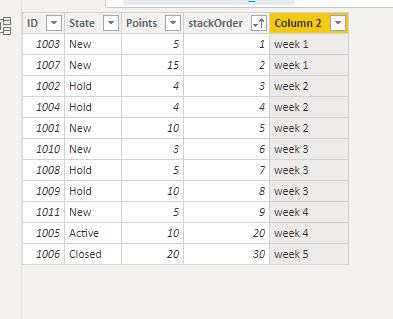
Try to create a new column like below:

Column 2 = var total_ =
SUMX(FILTER('Table','Table'[stackOrder]<=EARLIER('Table'[stackOrder])),'Table'[Points])
var week_number = ROUNDUP(DIVIDE(total_,20),-0.1)
return "week "&week_number

Vlianlmsft_0-1635143852024.png


View solution in original post

3 REPLIES 3
V-lianl-msft
Community Support
Community Support

Try to create a new column like below:

Column 2 = var total_ =
SUMX(FILTER('Table','Table'[stackOrder]<=EARLIER('Table'[stackOrder])),'Table'[Points])
var week_number = ROUNDUP(DIVIDE(total_,20),-0.1)
return "week "&week_number

Vlianlmsft_0-1635143852024.png


Thank you this is working perfectly.

but bit of help with dyanmic week number.

currently we are in week 20(current week) lets says. week 20 defined by start date and end date

 
TODAY () >= Table[StartDate]
&& TODAY () <= Table[EndDate]
 

so i need to add above column which you created 20+1 as week 21.

This will chnage next week as week 21, than 21+1 as week 22.

bideveloper555
Helper IV
Helper IV

@parry2k any help?

Helpful resources

Announcements
Sticker Challenge 2026 Carousel

Join our Community Sticker Challenge 2026

If you love stickers, then you will definitely want to check out our Community Sticker Challenge!

January Power BI Update Carousel

Power BI Monthly Update - January 2026

Check out the January 2026 Power BI update to learn about new features.

FabCon Atlanta 2026 carousel

FabCon Atlanta 2026

Join us at FabCon Atlanta, March 16-20, for the ultimate Fabric, Power BI, AI and SQL community-led event. Save $200 with code FABCOMM.

Users online (1,560)