Don't miss your chance to take the Fabric Data Engineer (DP-700) exam on us!
Learn moreWe've captured the moments from FabCon & SQLCon that everyone is talking about, and we are bringing them to the community, live and on-demand. Starts on April 14th. Register now
I have the following data:-
table name
program code
patient count
date
and I am trying to create a report in the following format
tablename program code 1/1/2019 (date) 2/2/2019 (date) --> Headers
abc(table_name) xyz (program code) 100 (patient count ) 200(patient count) ---> Values
I am unable to display the program code as a differentcolumn when I use matrix, since values for only one row is displayed.
Solved! Go to Solution.
Hi @Anonymous,
tablename program code 1/1/2019 (date) 2/2/2019 (date) --> Headers
abc(table_name) xyz (program code) 100 (patient count ) 200(patient count) ---> Values
To achieve above output, you just need to place [tablename] and [program code] into Matrix row, place [date] into columns and place [patient count] into values section.
I cannot understand what you said "I am unable to display the program code as a differentcolumn when I use matrix, since values for only one row is displayed.", please illustrate with sample data.
Regards,
Yuliana Gu
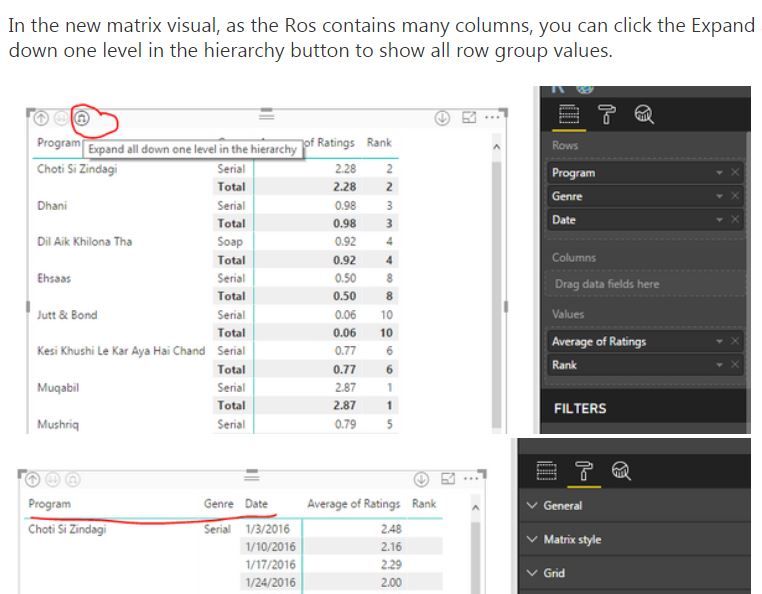
I had to do this to make it work:-
If you have recently started exploring Fabric, we'd love to hear how it's going. Your feedback can help with product improvements.
A new Power BI DataViz World Championship is coming this June! Don't miss out on submitting your entry.
Share feedback directly with Fabric product managers, participate in targeted research studies and influence the Fabric roadmap.
| User | Count |
|---|---|
| 56 | |
| 40 | |
| 36 | |
| 20 | |
| 18 |
| User | Count |
|---|---|
| 73 | |
| 73 | |
| 38 | |
| 35 | |
| 26 |